Vision-Language Models Explained: CLIP, Captioning, VQA
Learn how vision-language models work: image encoders, CLIP embeddings, captioning, and visual question answering, with a runnable Python demo.

Vision-language models (VLMs) are AI systems that learn from images and text together. They can describe a photo, answer a question about a chart, find the picture that best matches a sentence, or classify images into categories you only define in words.
This guide explains how vision-language models work, step by step. You will learn the building blocks, the difference between contrastive models such as CLIP and generative models that write text, the main tasks (captioning, visual question answering, retrieval), and how to run three real models in Python. You will also see where VLMs still fail, which matters before you trust one with real work.
What Is a Vision-Language Model?
A vision-language model is a multimodal model: it takes more than one type of input, here pixels and words, and connects them. Classic computer vision models output fixed labels such as “dog” or “cat”. A language model only reads text. A VLM bridges the two, so you can ask open-ended questions about an image in plain language.
That flexibility is the main change. Instead of training a new classifier for every task, you can often describe the task in words and let a pretrained model handle it.
How Vision-Language Models Work
Most VLMs combine three parts. A diagram helps, and the pattern below is shared by many open models.
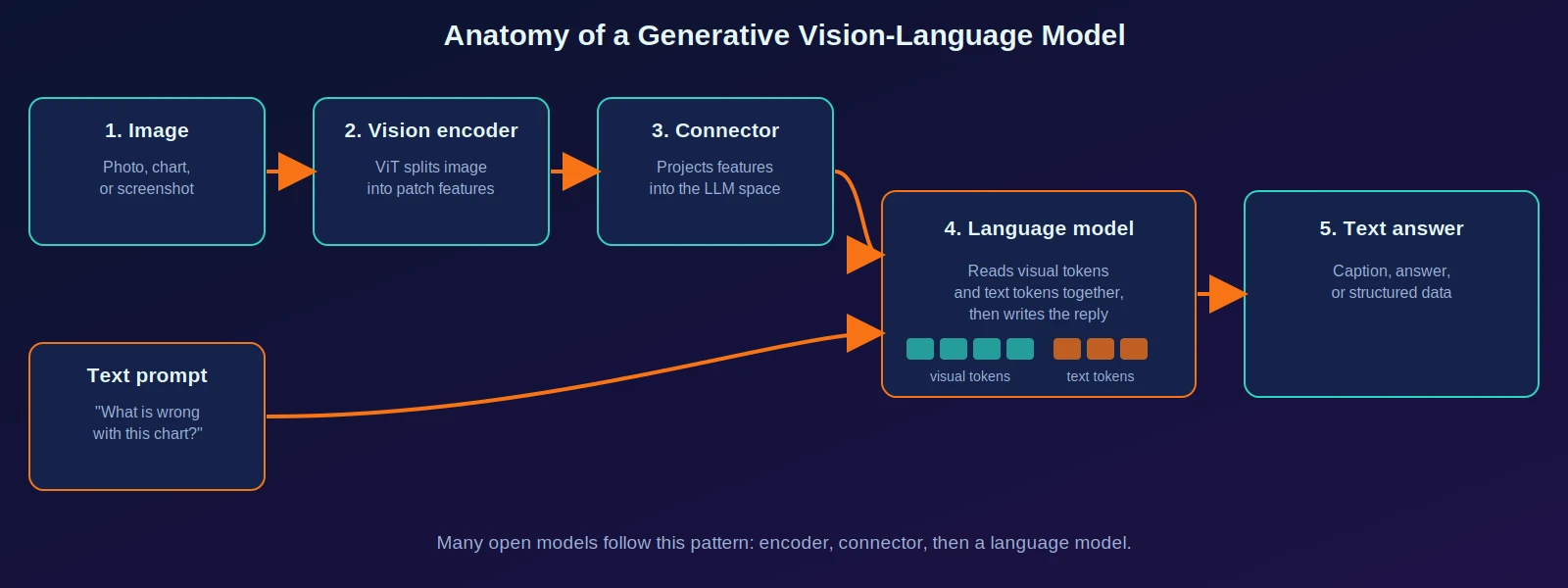
- Vision encoder. Usually a Vision Transformer (ViT). It cuts the image into patches and turns them into feature vectors.
- Connector (projection). Image features and a language model’s text embeddings live in different spaces, so a small module maps one into the other. The original LLaVA used a simple two-layer MLP for this job.
- Language model. A Transformer that reads the visual tokens and the text prompt together and writes the answer one token at a time.
Not every VLM has all three parts. CLIP, for example, has a vision encoder and a text encoder but no text-generating language model. That leads to the key distinction.
Two Families: Contrastive and Generative
| Contrastive (dual encoder) | Generative (writes text) | |
|---|---|---|
| Example | CLIP | BLIP, BLIP-2, LLaVA-style models |
| Output | A similarity score between an image and a text | New text: caption, answer, description |
| Typical tasks | Search, zero-shot classification, filtering | Captioning, visual question answering, document reading |
| Speed | Fast; embeddings can be precomputed | Slower; generates token by token |
| Weakness | Cannot explain or answer freely | Can produce confident wrong statements |
Many real systems use both: a contrastive model to retrieve candidate images, and a generative model to describe or reason about them.
CLIP: Learning a Shared Space for Images and Text
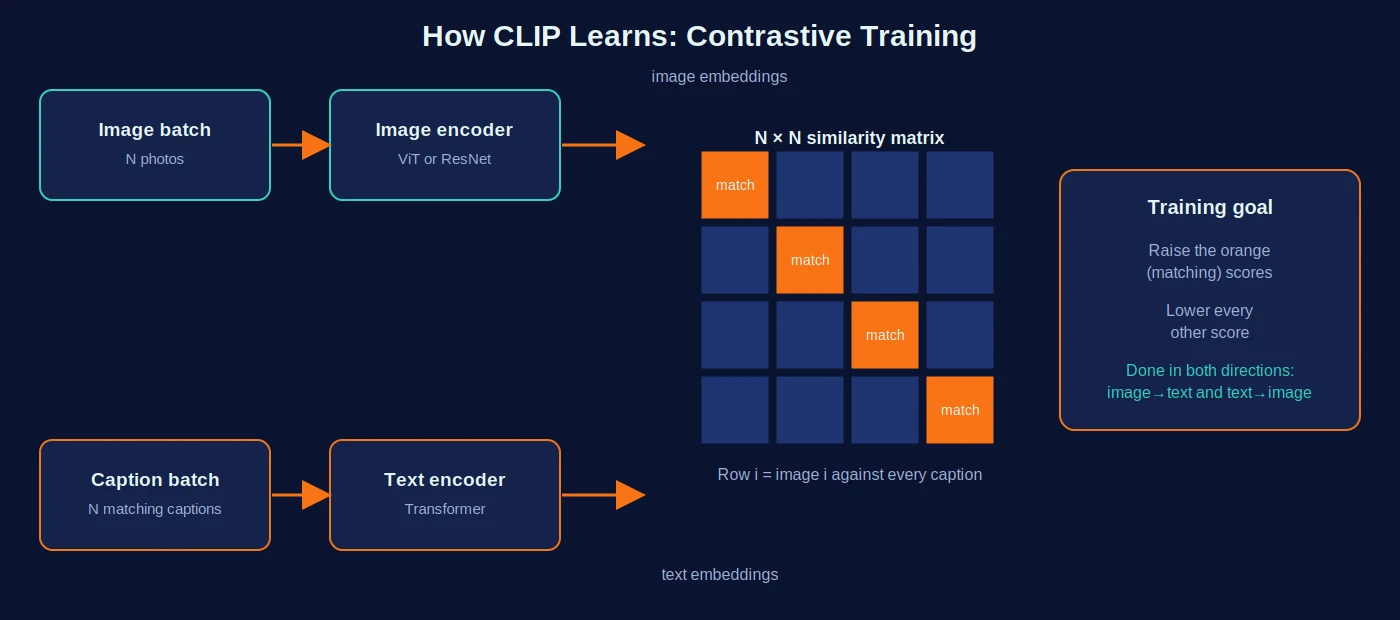
CLIP (Contrastive Language-Image Pre-training), released by OpenAI in 2021, is the model that made image-text alignment practical at scale. It has an image encoder and a text encoder. Both turn their input into a vector, and training pushes matching image-caption pairs close together and mismatched pairs apart.
The math, in plain words
Take a batch of image-caption pairs. Let be the normalized embedding of image and the normalized embedding of caption . Normalized means each vector has length 1, so their dot product is the cosine similarity, a number between -1 and 1 that measures how aligned the two vectors are.
Here is the score for image against caption , and is a temperature-like scale factor that sharpens differences (learned during training). The training loss asks each image to pick out its own caption among the options, and each caption to pick out its own image:
The diagonal of the similarity matrix holds the correct pairs. Minimizing the loss raises the diagonal and lowers everything else.
A worked example with toy numbers
Real CLIP embeddings have hundreds of dimensions. This three-dimensional toy version shows the exact computation used for zero-shot classification:
import numpy as np

def normalize(v):
    return v / np.linalg.norm(v, axis=-1, keepdims=True)

# Toy 3-D embeddings (real CLIP uses 512 or more dimensions)
image = normalize(np.array([[0.9, 0.1, 0.2]]))            # photo of a dog on a beach
texts = normalize(np.array([[0.8, 0.2, 0.1],              # "a dog on a beach"
                            [0.1, 0.9, 0.3],              # "a plate of pasta"
                            [0.2, 0.3, 0.9]]))            # "a city skyline"

cos = image @ texts.T                                     # cosine similarity
scale = 100.0                                             # temperature (logit scale)
logits = scale * cos
probs = np.exp(logits - logits.max()) / np.exp(logits - logits.max()).sum()

print("cosine:", np.round(cos, 3))
print("probs :", np.round(probs, 3))
Output:
cosine: [[0.987 0.271 0.434]]
probs : [[1. 0. 0.]]
The image is nearly aligned with the first caption (cosine 0.987) and far from the others, so softmax gives it essentially all the probability. A high scale makes the result very confident, which is also why CLIP probabilities should not be read as calibrated certainty.
Why this enables zero-shot classification
To classify an image with CLIP you write each candidate class as a sentence (for example “a photo of a bicycle”), embed the sentences, and pick the one most similar to the image. You never train on those classes. CLIP is usually not better than a model fine-tuned for one specific task, but it is far more flexible.
What Can Vision-Language Models Do?
| Task | What it does | Typical model type |
|---|---|---|
| Image captioning | Writes a sentence describing an image | Generative (BLIP, LLaVA-style) |
| Visual question answering (VQA) | Answers a text question about an image | Generative |
| Image-text retrieval | Finds images for a text query, or the reverse | Contrastive (CLIP) |
| Zero-shot classification | Labels images with categories given in words | Contrastive |
| Document and chart understanding | Extracts or explains content from pages, charts, screenshots | Generative, often larger models |
| Visual grounding | Points to the region matching a phrase | Specialized or large generative models |
Visual question answering and captioning are the most beginner-friendly, so the demo below uses them.
Hands-On: Three VLMs in Python
This demo uses the Hugging Face transformers library. The class names and checkpoints below (CLIPModel, BlipForConditionalGeneration, BlipForQuestionAnswering, openai/clip-vit-base-patch32, Salesforce/blip-image-captioning-base, Salesforce/blip-vqa-base) match the patterns shown in the official documentation and model cards.
Install the dependencies:
pip install torch transformers pillowWeights download automatically on first run and add up to several gigabytes in total, so use a stable connection. Put a photo called street.jpg in the same folder.
import torch
from PIL import Image
from transformers import (
    CLIPModel, CLIPProcessor,
    BlipProcessor, BlipForConditionalGeneration, BlipForQuestionAnswering,
)

device = "cuda" if torch.cuda.is_available() else "cpu"
image = Image.open("street.jpg").convert("RGB")

# 1) CLIP: zero-shot classification and similarity
clip = CLIPModel.from_pretrained("openai/clip-vit-base-patch32").to(device).eval()
clip_proc = CLIPProcessor.from_pretrained("openai/clip-vit-base-patch32")

labels = ["a photo of a street", "a photo of a beach", "a photo of a kitchen"]
inputs = clip_proc(text=labels, images=image, return_tensors="pt", padding=True).to(device)
with torch.inference_mode():
    out = clip(**inputs)

probs = out.logits_per_image.softmax(dim=1)[0]
for label, p in zip(labels, probs):
    print(f"{label:<28} {p:.1%}")

# image_embeds and text_embeds are the normalized vectors from the math section
cos = out.image_embeds @ out.text_embeds.T
print("cosine similarity:", cos.squeeze(0).tolist())

# 2) BLIP: image captioning
cap_proc = BlipProcessor.from_pretrained("Salesforce/blip-image-captioning-base")
cap_model = BlipForConditionalGeneration.from_pretrained(
    "Salesforce/blip-image-captioning-base").to(device).eval()

inputs = cap_proc(images=image, return_tensors="pt").to(device)
with torch.inference_mode():
    ids = cap_model.generate(**inputs, max_new_tokens=30)
print("Caption:", cap_proc.decode(ids[0], skip_special_tokens=True))

# 3) BLIP: visual question answering
vqa_proc = BlipProcessor.from_pretrained("Salesforce/blip-vqa-base")
vqa_model = BlipForQuestionAnswering.from_pretrained(
    "Salesforce/blip-vqa-base").to(device).eval()

question = "What is the weather like?"
inputs = vqa_proc(image, question, return_tensors="pt").to(device)
with torch.inference_mode():
    ids = vqa_model.generate(**inputs)
print("Answer:", vqa_proc.decode(ids[0], skip_special_tokens=True))
Your output depends on your photo, so the exact text will differ. You should see three label probabilities that sum to 100%, a short caption, and a short VQA answer, often one or two words.
Note: these snippets follow the documented usage patterns but were not executed while this article was prepared. Run them yourself and check the library version if an argument name has changed.
Common mistakes and troubleshooting
- Writing bare class names for CLIP. Sentences such as “a photo of a bicycle” usually work better than the single word “bicycle”, because that is closer to the captions CLIP learned from. Try a few phrasings and compare.
- Out-of-memory errors. Use the base checkpoints shown here, run on CPU, or reduce the image size. Large VLMs need a lot of GPU memory.
- Short VQA answers. BLIP’s VQA checkpoint is built to give brief answers. For long explanations you need a larger generative model.
- Four-channel images. Convert to RGB, as the code does, to avoid shape errors from transparent PNGs.
- Trusting one output. Ask the same question in different wording. If the answers disagree, treat all of them with suspicion.
Which Approach Should You Use?
| Your situation | Start with | Why |
|---|---|---|
| Search a photo library by text | CLIP embeddings | Precompute once, compare fast |
| Label images into custom categories, no training data | CLIP zero-shot | Classes are just sentences |
| Describe images or write alt text drafts | Captioning model | Generates natural-language text |
| Answer questions about images | VQA or a generative VLM | Takes a question as input |
| Read charts, forms, or screenshots | A larger generative VLM | Needs reasoning over text in images |
| Fixed task with lots of labelled data | A fine-tuned classifier | Often more accurate and cheaper |
Limitations and Risks
Vision-language models are impressive and still unreliable in specific, predictable ways.
- Hallucination. A generative VLM can describe objects that are not in the image. Language habits can override what the pixels show.
- Counting and spatial reasoning. Questions like “how many” or “what is to the left of what” are common failure points.
- Reading small text. Fine print, dense charts, and low-resolution screenshots are hard.
- Bias. Models inherit the associations in their training data, which can lead to stereotyped captions or uneven accuracy across groups and regions.
- Prompt sensitivity. Small wording changes can change an answer.
- Privacy and safety. Describing or identifying people in photos raises consent and legal questions that depend on jurisdiction.
Keep a human in the loop for medical, legal, safety-related, or accessibility-critical uses, and evaluate on images that resemble your real data. Because new VLMs are released often, this article does not rank them: check a current benchmark or leaderboard and test candidates on your own examples before choosing one.
Frequently Asked Questions
What is the difference between a VLM and a computer vision model?
A traditional computer vision model predicts from a fixed set of outputs, such as class labels or boxes. A VLM links images to language, so the task can be described or answered in text and is not limited to a fixed label set.
Is CLIP a vision-language model?
Yes. CLIP is a contrastive vision-language model. It scores how well an image and a text match, but it does not write text.
What is visual question answering?
Visual question answering (VQA) is the task of answering a text question about an image, such as “What color is the car?”
Do I need a GPU?
Not for the base models in this guide, although a GPU makes them much faster. Larger generative VLMs usually need one.
Are VLMs the same as multimodal AI?
VLMs are one kind of multimodal AI. Multimodal systems can also include audio, video, or other inputs.
Where to Go Next
- Run the demo on ten of your own photos and note where captions and answers go wrong.
- Build a tiny image search: embed a folder of images with CLIP and rank them for text queries.
- Compare a captioning model with a larger generative VLM on the same images.
- Read the CLIP and LLaVA papers for the details behind the architecture described here.
References
- Hugging Face Transformers: CLIP model documentation
- Hugging Face model card: Salesforce/blip-vqa-base
- Hugging Face blog: Vision Language Models Explained
- Hugging Face Community Computer Vision Course: Contrastive Language-Image Pre-training (CLIP)
- Radford et al., Learning Transferable Visual Models From Natural Language Supervision (CLIP)
- Dosovitskiy et al., An Image is Worth 16x16 Words (Vision Transformer)
- Li et al., BLIP: Bootstrapping Language-Image Pre-training
- Li et al., BLIP-2
- Liu et al., Visual Instruction Tuning (LLaVA)