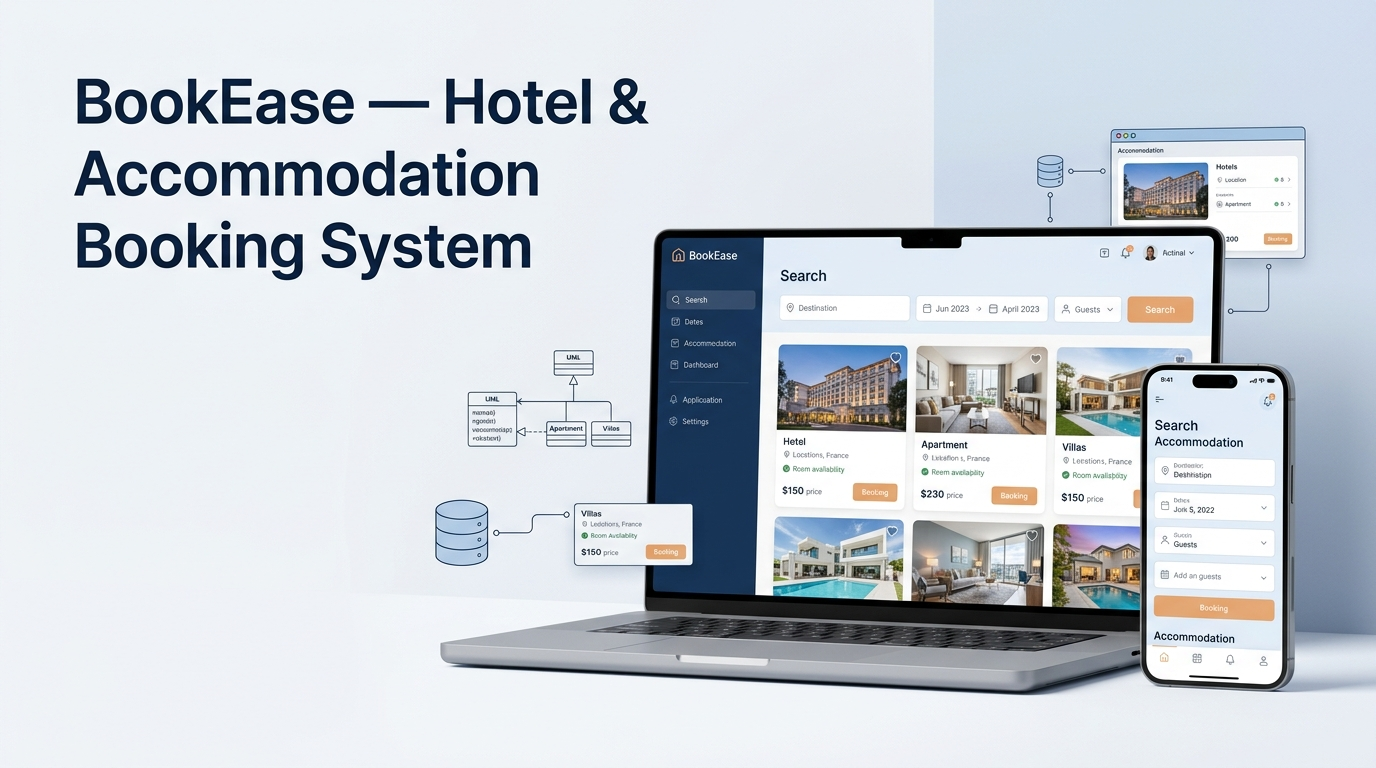
BookEase: Building an Accommodation Booking System with Django
How do you design and build an accommodation booking website using Python and Django? BookEase is a full-stack web development project I created as my final-year project for the Licence in Sciences Mathématiques et Informatique (SMI).
The project explores how an accommodation booking platform can bring property discovery, room listings, client accounts, reservation management, payment-related interfaces, and administrative tools into one web application.
Using Python, Django, HTML, CSS, JavaScript, and Tailwind CSS, I worked through several stages of software development: requirements analysis, UML modelling, data modelling, interface development, and technical documentation.
This case study presents the project’s objectives, system design, documented features, technology stack, and lessons learned while developing a Django-based accommodation booking system.
Project overview
- Project: BookEase accommodation booking platform
- Academic context: Licence SMI final-year project
- Main framework: Django
- Programming language: Python
- Project focus: Full-stack web development, UML, and database-oriented application design
- Source code: BookEase on GitHub
- Academic report: Read the complete project report (PDF)
Note: The report presents the application under the name BookEase, although BookEasy also appears in some figure captions. This article uses BookEase consistently.
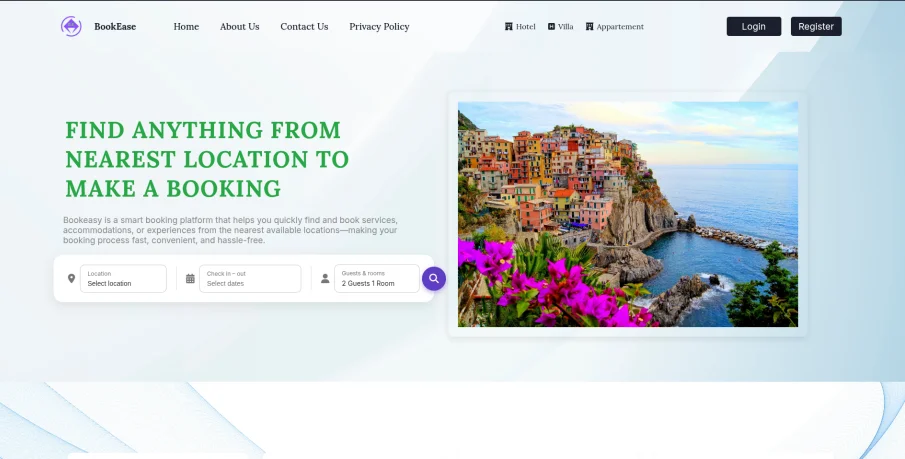
Figure 1: BookEase homepage, introducing the accommodation search experience.
1. Project objectives: Why build an accommodation booking platform?
Finding suitable accommodation can involve comparing property descriptions, room options, prices, locations, availability, and booking conditions across different pages. A booking platform aims to bring these tasks together in a more organised experience.
The main objective of BookEase was to develop a web-based accommodation booking system for properties such as hotels, villas, and apartments. The project explored how visitors could discover properties, registered clients could access booking-related features, and administrators could manage the platform’s information.
The main objectives were to:
- Organise accommodation categories and property listings in one interface.
- Allow visitors to browse and search for properties using criteria such as location, dates, category, price, and ratings.
- Provide registered clients with account and profile management features.
- Present room information and booking-related interfaces.
- Display booking summaries and receipt layouts, including a PDF download option.
- Provide administrative pages for managing accommodations, rooms, reservations, testimonials, and contact messages.
- Structure the application using Django’s data models, request-handling logic, and templates.
The project report also identifies performance, security, usability, reliability, portability, integration, and scalability as non-functional requirements. These are design objectives rather than independently verified performance or security guarantees.
2. User roles and booking workflows
The requirements analysis organised the application around three main actors: visitors, registered clients, and administrators. Defining these roles helped establish which features belonged to each part of the system.
Visitor: Discover accommodation
Visitors can browse property listings, explore accommodation categories, inspect details, use search and filters, read testimonials, and access informational pages. Account registration provides a path to the client-specific features.
Registered client: Manage account and bookings
The client-facing interfaces cover sign-in, profile management, accommodation search, room selection, booking history, and payment-related information.
The report also documents email verification, password recovery, and booking receipts. These workflows help illustrate the different steps involved in an accommodation booking application.
Administrator: Manage platform information
The administrator area provides interfaces for managing accommodation listings, rooms, reservations, testimonials, and contact messages. The dashboard also displays summary indicators and recent activity.
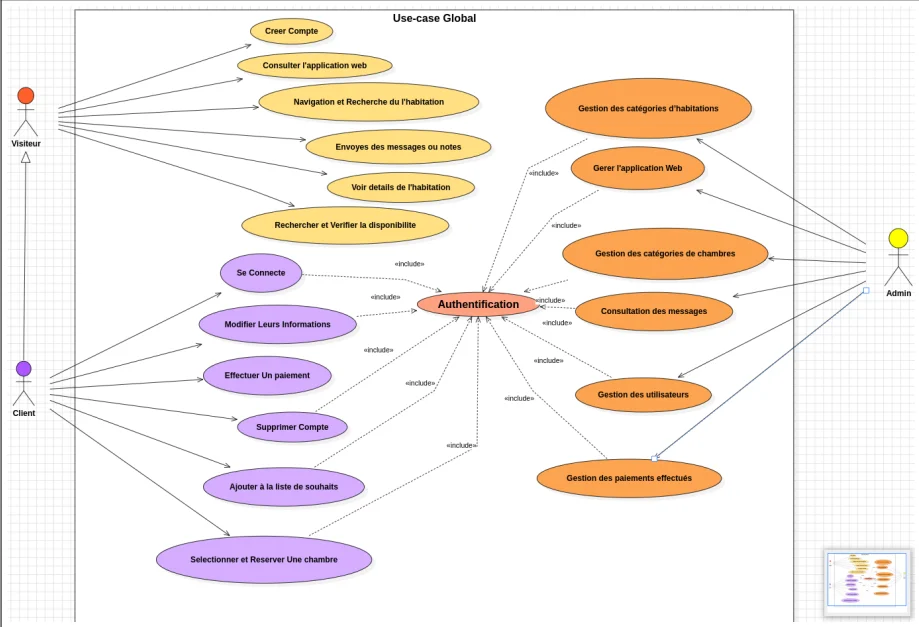
Figure 2: UML use-case diagram showing the main actors and their interactions with BookEase.
3. UML modelling and database design
Before implementing the application, I used Unified Modeling Language (UML) diagrams to describe the system’s structure and important interactions.
The project report includes class diagrams, use-case diagrams, and sequence diagrams for workflows such as authentication, registration, email verification, password recovery, accommodation search, and property creation.
UML class diagram and application entities
The class diagram describes the main entities and their relationships. The report identifies classes such as CustomUser, Profile, EmailAddress, EmailConfirmation, Hotel, Room, Accommodation, AccommodationRoom, Category, Facility, Amenity, AccommodationImage, HotelImage, Booking, Rating, and HotelPage.
These entities can be grouped into four broad areas:
- Users and profiles: Account information, profile details, and email confirmation.
- Accommodation inventory: Properties, rooms, categories, facilities, amenities, and images.
- Reservations: Booking records associated with clients and accommodation or room information.
- Ratings and feedback: Rating-related information and content displayed as customer feedback.
Separating property information from room-level details is important for a booking application. A property may contain several rooms, and each room can have its own capacity, price, type, or availability information.
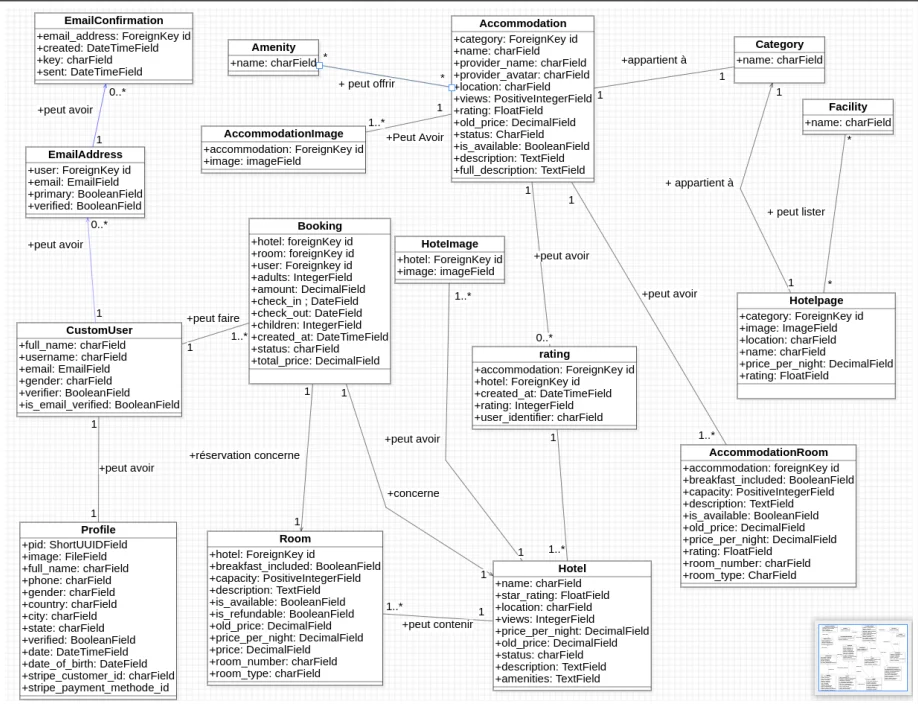
Figure 3: UML class diagram illustrating the principal entities and relationships in the application.
Sequence diagrams: From user actions to system responses
Sequence diagrams describe how components interact over time. In BookEase, they help explain how a user action moves through the interface, Django application, database, and other relevant components.
For example, an accommodation search begins when a visitor enters search criteria. The application processes the request, retrieves matching information from the data store, and presents the results or a no-results message.
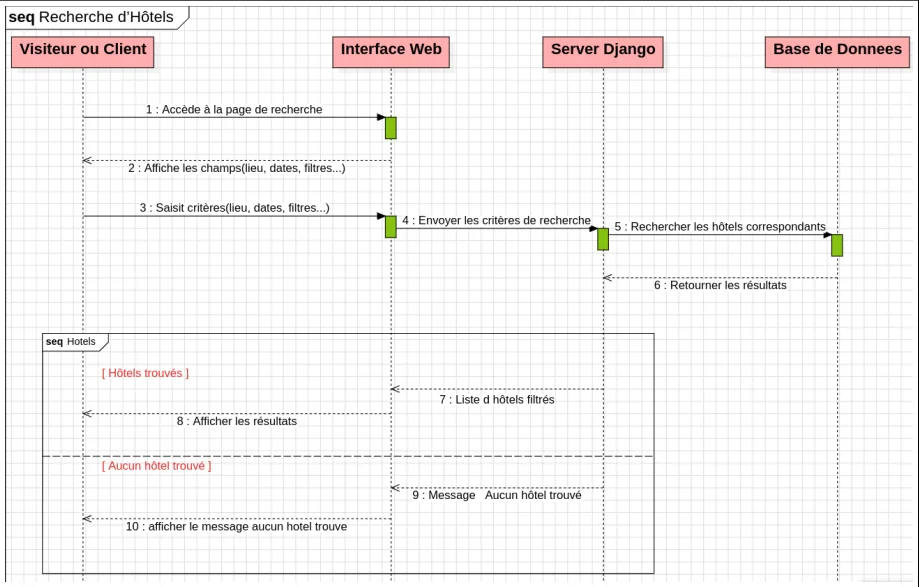
Figure 4: Accommodation search sequence, from user input to the display of results.
The report also documents several account-related workflows.
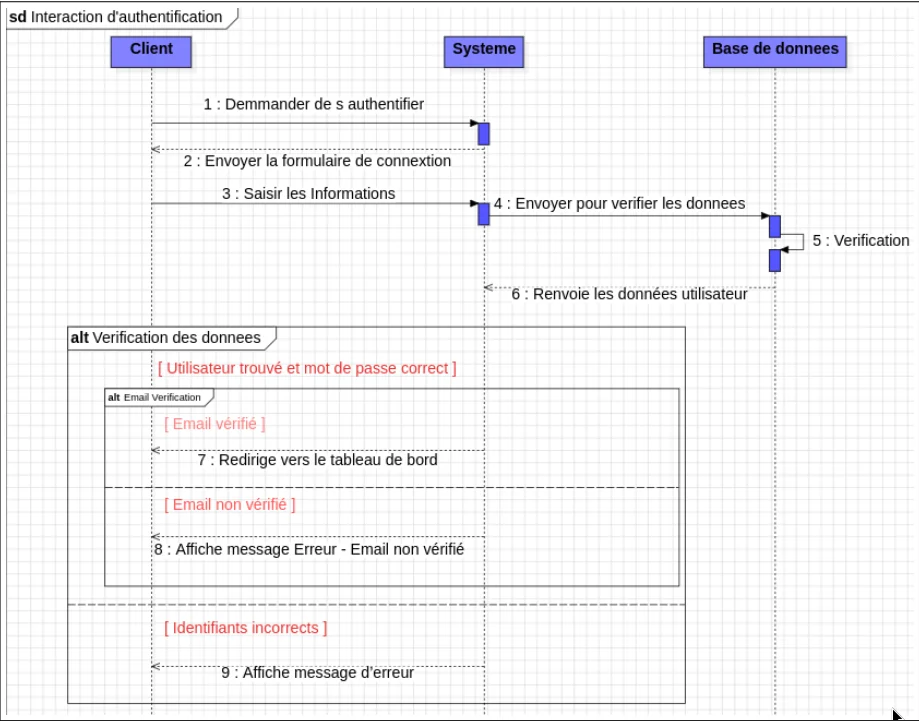
Figure 5: Authentication sequence illustrating credential validation and relevant failure scenarios.
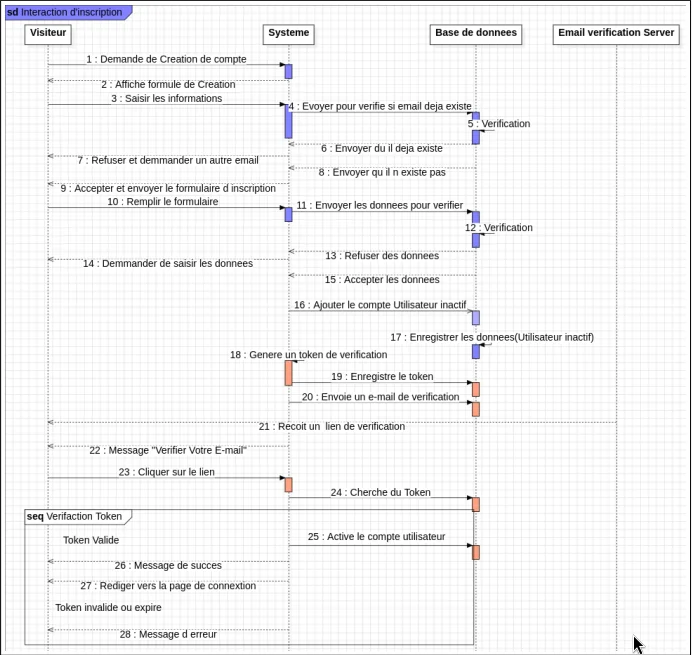
Figure 6: Registration sequence covering email checks and account creation.
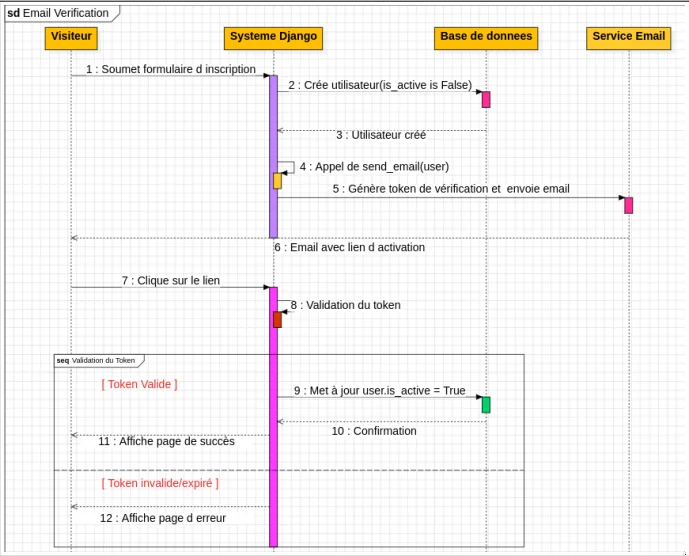
Figure 7: Email verification workflow following registration.
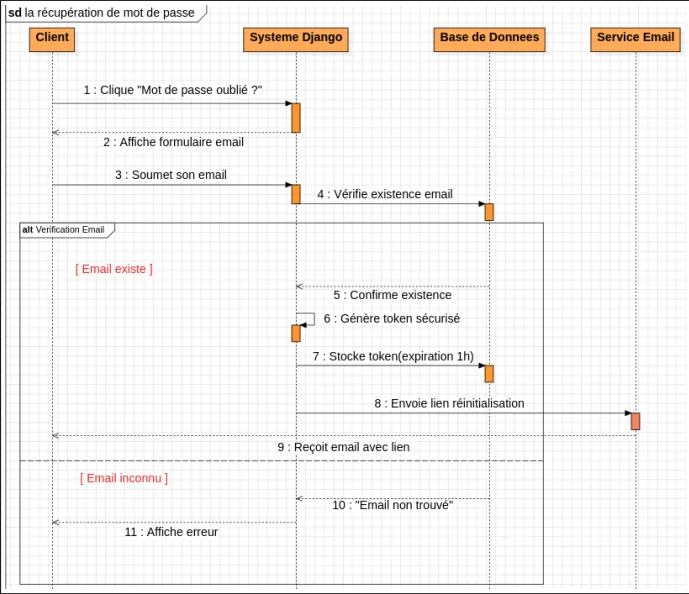
Figure 8: Password recovery sequence documenting the account reset workflow.
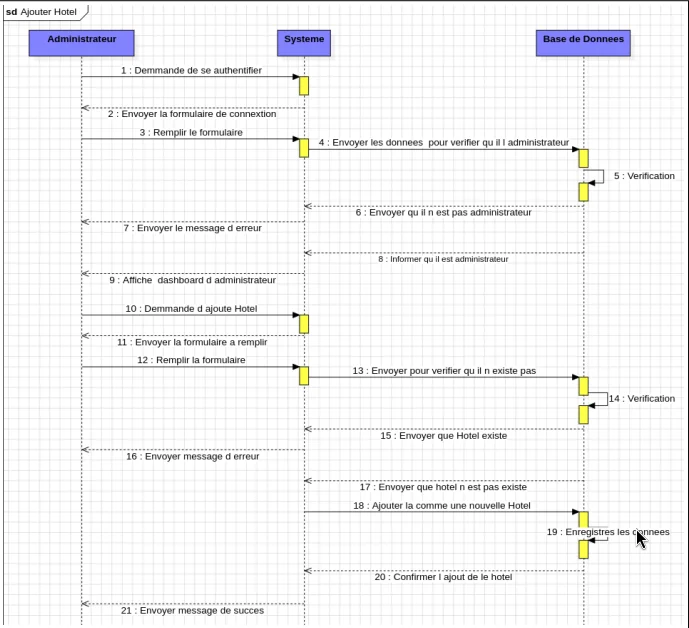
Figure 9: Accommodation creation sequence from the administrator interface.
These diagrams helped translate broad requirements into specific system interactions before implementation. They also provide technical documentation that can be revisited when reviewing the design or extending the application.
4. Technology stack and Django architecture
BookEase combines a Python-based back end with browser-facing technologies. The report identifies Django as the main web framework and describes its Model–Template–View (MTV), also commonly called Model–View–Template (MVT), architecture.
Main technologies
| Technology or tool | Role in the project |
|---|---|
| Python | Main programming language |
| Django | Server-side framework, request handling, models, and application workflows |
| HTML | Web page structure |
| CSS | Interface styling |
| JavaScript | Browser-side interactions |
| Tailwind CSS | Utility-based interface styling |
| StarUML | UML diagrams and system modelling |
| Git and GitHub | Version control and source-code hosting |
| Stripe | Payment-related integration identified in the report |
| Render | Hosting platform identified in the report |
| Visual Studio Code | Development environment |
| Canva | Supporting graphic design work |
Understanding Django’s MVT pattern
Django separates important application responsibilities into three main parts:
- Model: Defines data structures and interacts with the database through Django’s data layer.
- Template: Controls how information is presented in HTML.
- View: Processes requests, applies application logic, retrieves relevant data, and returns a response.
This separation makes the application easier to organise and maintain. It also allows developers to reuse templates and data models across different pages.
For an accommodation booking system, this architecture provides a practical foundation for handling property listings, client accounts, room information, and administrative workflows.
The report identifies Stripe and Render as part of the project technology choices. However, the presence of payment screens or a hosting platform in the documentation does not, by itself, confirm that a live production payment flow or deployment is currently available.
5. BookEase user interface and documented features
The report documents public-facing pages, client account screens, and administrative interfaces. Together, these illustrate the main parts of the proposed accommodation booking experience.
Homepage and navigation
The homepage introduces the BookEase identity and provides navigation to accommodation categories, informational pages, and authentication options.
Its documented sections include a location-oriented search message, accommodation categories, platform benefits, featured properties, testimonials, and a footer with additional navigation.
Accommodation listings and search
The listing interfaces display property cards with information such as names, categories, locations, ratings or views, and prices. Category filters help users explore the catalogue and compare properties.
Search and filtering are important parts of an accommodation platform because they help users narrow a broad collection of listings to options relevant to their requirements.
Property details and room selection
The property details interface presents accommodation information and images. A room-selection section provides room-level details, stay criteria, prices, and booking actions.
This structure separates general property information from the details needed to evaluate a particular room.
Registration, login, and profile management
The client-facing interfaces include account registration and login pages. The documented registration workflow checks whether an email address is already registered, while the account-related diagrams cover email verification and password recovery.
The profile area allows users to review and update personal information. A confirmation dialog is also documented for profile deletion.
Booking history and receipt generation
The My Bookings interface allows clients to review their reservation records. The report includes two receipt layouts:
- A compact booking summary with a PDF download option.
- A more detailed receipt containing user, accommodation, room, stay, and payment information.
These screens demonstrate how booking-related information can be organised for clients after a reservation has been recorded.
Payment-related interfaces
The client dashboard includes interfaces for viewing existing payment methods and adding new ones. Stripe is identified in the project report as the payment service.
These are documented interface and integration details, not proof of a fully configured production payment system. Any live payment workflow would need to be verified separately.
6. Administrator dashboard and management tools
A booking platform needs administrative tools as well as a public interface. BookEase includes a separate administrator login and dashboard for managing platform information.
Dashboard overview
According to the report, the dashboard presents summary indicators related to bookings, confirmed revenue, recent users, incoming messages, and recent activity.
These indicators are intended to give administrators a central overview of platform records.
Accommodation and room management
The accommodation management pages cover property records and associated details. The documented forms include descriptive information, location, price, status, and images.
Room management provides a separate interface for handling room-level information and availability-related details.
Reservation management
The reservation management interface centralises booking records and their statuses. It provides an administrative area for reviewing and managing reservations recorded by the application.
Testimonials and contact messages
Administrators can manage customer testimonials displayed on the public website and review messages submitted through the contact form.
Together, these interfaces demonstrate how the project brings property management, room information, reservations, feedback, and incoming enquiries into one administrative area.
7. Development process
I approached the project through five main stages documented in the report.
- Requirements analysis: Identify user roles, functional requirements, and the main workflows.
- System design: Create UML diagrams and organise the main entities and relationships.
- Implementation: Develop the Django application and browser-facing interfaces.
- Testing and validation: Check application behaviour and address issues found during development. The report describes this stage but does not provide a detailed automated test suite or numerical results.
- Documentation: Record the system design, functional scope, and technical decisions in the final academic report.
This process helped connect the requirements to specific models, interfaces, and workflows instead of treating the application as a collection of unrelated pages.
8. Challenges and lessons learned
Developing BookEase gave me experience with several connected areas of full-stack web development.
Requirements and system modelling: UML diagrams helped me represent user roles, data relationships, and important workflows before implementing them.
Data modelling: Accommodation and room inventory require careful separation of property-level and room-level information. This distinction is important when representing prices, capacities, and availability.
Application structure: Django’s MVT architecture provided a way to separate data models, request-handling logic, and templates.
User and administrator workflows: A booking application involves more than a search page. Registration, email verification, profile management, booking history, receipt presentation, and administrative tools all contribute to the overall experience.
Technical documentation: Recording the design and workflows made the project easier to explain and provided a reference for potential future development.
9. Future improvements
If I continue developing BookEase, several improvements could strengthen its reliability, usability, and maintainability.
- Automated testing: Add tests for registration, authentication, email verification, booking validation, and reservation edge cases.
- Room availability validation: Test that conflicting reservations cannot claim the same room for overlapping dates.
- Payment verification: Validate the complete payment lifecycle in a test environment, including server-side confirmation and cancellation or failure handling.
- Accessibility: Review keyboard navigation, form labels, colour contrast, and screen-reader usability.
- Responsive design: Test common mobile, tablet, and desktop screen sizes.
- Performance: Measure page loading and search behaviour with realistic amounts of data.
- Deployment and security: Review environment variables, secret management, error logging, database backups, and production configuration.
- Documentation: Clearly distinguish planned requirements, documented interface behaviour, and features verified in a running deployment.
These are proposed future improvements, not claims that every item has already been implemented.
Conclusion
BookEase was a practical opportunity to design and develop a full-stack web application around accommodation discovery and booking-related workflows.
The project brought together Python, Django, UML modelling, data-oriented application design, front-end development, client account interfaces, booking records, receipt layouts, and administrative management tools.
Beyond the individual screens, the main lesson was how to move from requirements to a structured system design and then to connected application interfaces. The experience strengthened my foundations in Django development and gave me a project I can use to discuss software design, database modelling, and full-stack web development.
Frequently asked questions about BookEase
What is BookEase?
BookEase is a Django-based accommodation booking web application developed as a Licence SMI final-year project. Its documented scope includes accommodation discovery, room selection, client account pages, receipt layouts, and administrative management.
Which technologies were used to build BookEase?
The project report identifies Python, Django, HTML, CSS, JavaScript, Tailwind CSS, Git, GitHub, StarUML, Stripe, Render, Visual Studio Code, and Canva among the technologies and tools used.
What is Django’s role in the application?
Django provides the server-side framework for application logic, data models, request handling, and templates. It helps organise the application’s core functionality into maintainable components.
What can the administrator manage?
The documented administrative interfaces cover accommodation listings, rooms, reservations, testimonials, and contact messages. The dashboard also displays summary information and recent activity.
Does BookEase support payments and PDF receipts?
The report documents payment-related screens and receipt layouts, including a PDF download option. A working production payment integration and a live deployment must be verified separately.
Where can I find the source code and project report?
The BookEase GitHub repository provides access to the project source. The academic project report provides further documentation and diagrams.
Project resources
- Source code: Explore BookEase on GitHub
- Academic report: Read the complete BookEase project report (PDF)
- GitHub profile: Explore my other repositories
- Developer portfolio: Visit my portfolio
- More projects: Browse the projects page