Python Programming: A Complete Guide to Concepts, Examples, and Exercises
Learn Python with worked examples: functions, lambdas, recursion, classes, number problems, series, and patterns, plus 28 graded exercises with solutions.
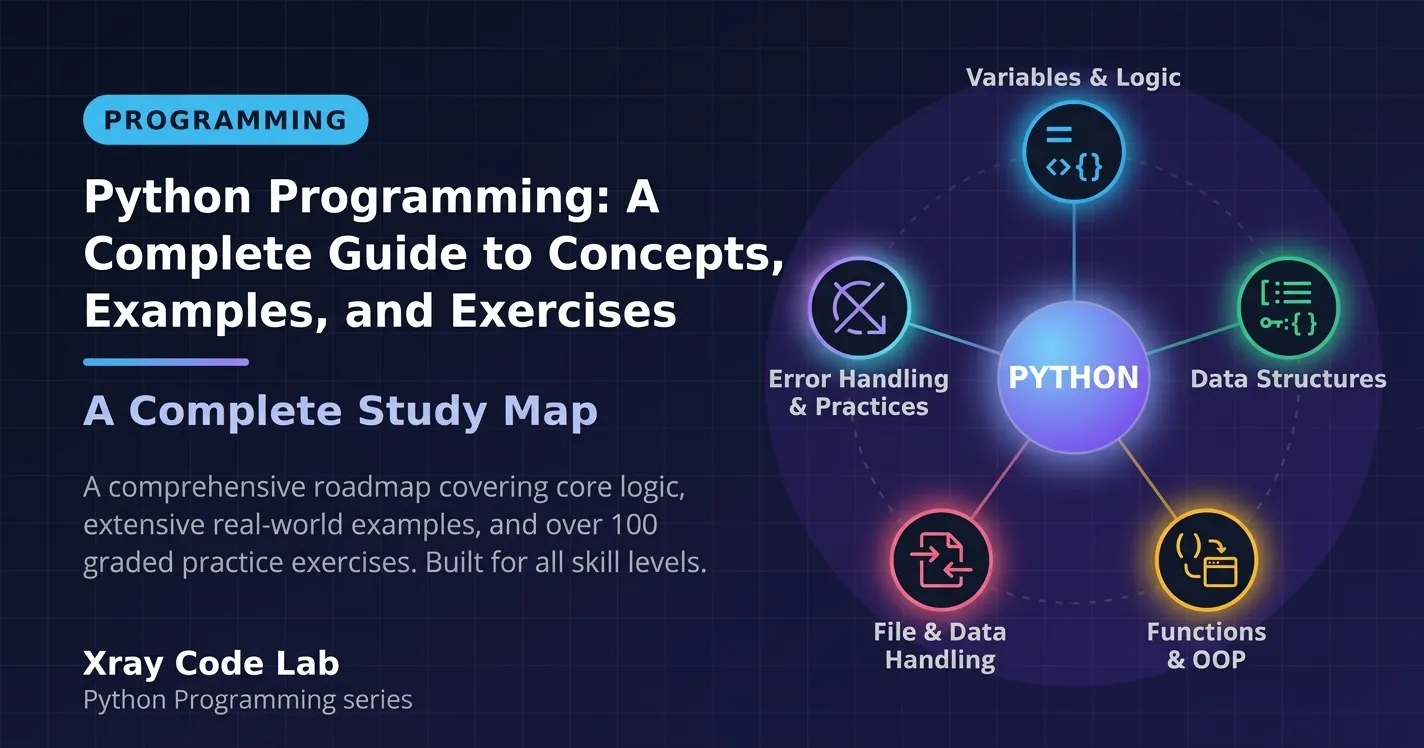
Python is the language most people reach for when they start in programming, data science, or machine learning. Its syntax is short, its standard library is large, and the same handful of ideas (functions, objects, loops, and clear problem decomposition) carry from a first script all the way to production data pipelines.
This guide builds those ideas through the kind of problems that appear in university labs and technical interviews: functions with flexible parameters, lambdas, recursion, classes and operator overloading, classic number problems, mathematical series, and pattern printing. Every concept follows the same rhythm: what it is, its syntax, a small example, the output, common mistakes, and a harder example. A graded practice section at the end collects exercises with hints and full solutions.
What you will learn
- How to read input, print precisely, branch, and loop.
- How default, variable-length, and keyword arguments really work.
- When lambdas help and when they hurt, and how recursion maps to a problem.
- How instance variables, multiple inheritance, and operator overloading behave.
- How to turn a number problem or a series into a clean loop (or a formula).
- How to design any text pattern from row and column indexes.
Table of Contents
- How to Use This Guide
- Python Basics You Need First
- Functions
- Classes and Objects
- Number Problems
- Arithmetic and Geometric Series
- Pattern Printing
- Strings and ASCII Codes
- Common Mistakes Worth Learning From
- Practice Exercises
- Summary and Next Steps
How to Use This Guide
All examples are plain Python 3 and need nothing beyond the standard library. Save a snippet as example.py and run python example.py, or paste it into a Jupyter notebook cell. For examples that call input(), the output shows the typed answer right after the prompt, as it would look in a terminal.
Two habits will speed up your learning more than anything else:
- Predict the output before you run the code. Wrong predictions are where learning happens.
- Change one thing and rerun. Edit a number, remove a line, and watch what breaks.
For the official reference, keep the Python tutorial and the standard library reference open in another tab.
Python Basics You Need First
The later sections assume you are comfortable with five small building blocks. If they are familiar, skim and move on.
Reading Input and Converting Types
input() always returns a string, even when the user types digits. To calculate with the value you must convert it with int() or float().
num1 = int(input("Enter 1st number: "))
num2 = int(input("Enter 2nd number: "))
print("num1 + num2 =", num1 + num2)
Output:
Enter 1st number: 3333
Enter 2nd number: 666
num1 + num2 = 3999int(input(...))first reads text, then converts it to an integer.printaccepts several values and separates them with a space.
Common mistake: forgetting the conversion. Strings are concatenated, not added.
a = input("a: ")
b = input("b: ")
print(a + b)       # "3" + "4" is the string "34"
print(int(a) + int(b))
Output:
a: 3
b: 4
34
7
If the user types something that is not a number, int() raises ValueError. Production code wraps the call in try/except; you will see that in exercise B1.
Printing with end and f-strings
By default print adds a newline. The end parameter changes that, which is the key to printing rows of a pattern one item at a time.
for j in range(1, 6):
    print(j, end=" ")
print()   # finish the line
Output:
1 2 3 4 5 An f-string embeds expressions directly in text, and a format spec such as .2f controls decimals.
name, score = "Aya", 92.456
print(f"{name} scored {score:.2f}")
print(f"{7} x {8} = {7 * 8}")
Output:
Aya scored 92.46
7 x 8 = 56
Conditions with if, elif, and else
A condition runs a block only when its test is true. Python checks branches from top to bottom and runs the first one that matches.
def describe(n):
    if n < 0:
        return "negative"
    elif n == 0:
        return "zero"
    else:
        return "positive"

for value in (-5, 0, 7):
    print(value, "is", describe(value))
Output:
-5 is negative
0 is zero
7 is positive
Common mistakes: writing = (assignment) instead of == (comparison), and forgetting that indentation defines the block.
Loops with for, while, and range
for repeats over a sequence; range(start, stop) produces numbers from start up to, but not including, stop. while repeats as long as a condition holds, which suits problems where you do not know the iteration count in advance, such as extracting digits.
n = 145
digits = []
while n != 0:
    digits.append(n % 10)   # last digit
    n //= 10                # drop the last digit
print(digits)
Output:
[5, 4, 1]The pair % 10 and // 10 is the standard way to peel digits off an integer. Remember it: it returns in the number problems below.
Lists and Type Checks
A list can hold values of different types. Sometimes you need to keep only one type, such as the integers in a mixed list.
items = ["abc", 34.56, 32, 3 + 4j, "b", 55, 65.7, "90", 180]
ints = []
for element in items:
    if type(element) == int:
        ints.append(element)
print(ints)
Output:
[32, 55, 180]Note that "90" is a string and 34.56 is a float, so neither is kept. There is a subtle trap: bool is a subclass of int, so isinstance(True, int) is True.
mixed = [1, True, 2.0, 3, False]
print([x for x in mixed if type(x) is int])      # exact type
print([x for x in mixed if isinstance(x, int)])  # includes bool
Output:
[1, 3]
[1, True, 3, False]
Use type(x) is int when you want exactly integers, and isinstance when subclasses are welcome. The bracketed one-line form is a list comprehension, a compact replacement for a loop that builds a list.
Functions
A function packages reusable logic behind a name. It receives parameters, may return a value, and keeps its own local variables. See the official section on defining functions.
Defining Functions and Returning Values
def rectangle_area(width, height):
    return width * height

print(rectangle_area(4, 5))
print(rectangle_area(height=2, width=10))   # keyword arguments, any order
Output:
20
20
A function without return gives back None. Using return ends the function immediately.
Default Arguments
A parameter with a value in the definition is optional. If the caller omits it, the default is used.
def add(a, b, c=5):      # c is a default argument
    return a + b + c

print("The addition is:", add(2, 3))
print("The addition is:", add(2, 3, 10))
Output:
The addition is: 10
The addition is: 15
Parameters without defaults must come before parameters with defaults; the reverse is a syntax error.
def broken(a=1, b):      # SyntaxError: parameter without a default follows parameter with a default
    return a + b
A famous trap: mutable defaults. The default value is created once, when the function is defined, not on every call.
def add_item(item, bucket=[]):
    bucket.append(item)
    return bucket

print(add_item("a"))
print(add_item("b"))     # the same list is reused!

def add_item_safe(item, bucket=None):
    if bucket is None:
        bucket = []
    bucket.append(item)
    return bucket

print(add_item_safe("a"))
print(add_item_safe("b"))
Output:
['a']
['a', 'b']
['a']
['b']
Use None as the default and create the mutable object inside the function.
Variable Positional Arguments
Sometimes you do not know how many values a caller will pass. Prefix a parameter with * and Python packs the extra positional values into a tuple.
def total(*numbers):
    return sum(numbers)

print(total(4, 8, 15))
print(total())            # an empty tuple sums to 0
values = [1, 2, 3]
print(total(*values))     # * in a call unpacks a list into separate arguments
Output:
27
0
6
By convention the parameter is named args, but any name works.
Variable Keyword Arguments
Prefix a parameter with ** and Python packs the extra named arguments into a dictionary. This is handy when the names themselves carry meaning, such as subject names and grades.
def average_of(**scores):
    values = list(scores.values())
    if not values:
        return 0.0
    return sum(values) / len(values)

print(f"Average is: {average_of(math=14, physics=11, informatics=17):.2f}")
print(f"Average is: {average_of(q1=5, q2=10, q3=15, q4=20):.2f}")
print(f"Average is: {average_of():.2f}")
Output:
Average is: 14.00
Average is: 12.50
Average is: 0.00
The guard for an empty dictionary prevents a ZeroDivisionError, a typical edge case worth handling.
Combining Every Parameter Kind
Python fixes the order: regular parameters, then defaults, then *args, then **kwargs. The diagram shows how one call is distributed.
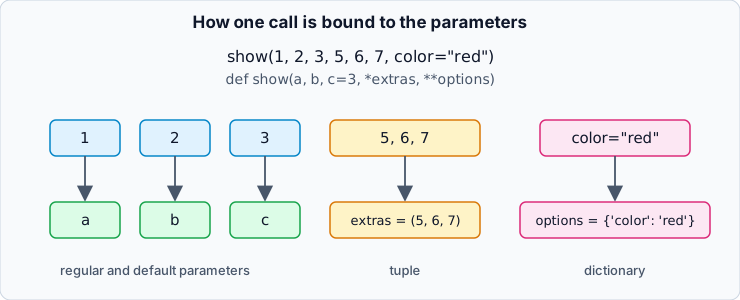
Figure 1: How Python binds positional and keyword arguments to parameters.
def show(a, b, c=3, *extras, **options):
    print("a, b, c =", a, b, c)
    print("extras  =", extras)
    print("options =", options)

show(1, 2, 3, 5, 6, 7, color="red", size=2)
show(1, 2)
show(1, 2, 3, "tag", unit="cm")
Output:
a, b, c = 1 2 3
extras  = (5, 6, 7)
options = {'color': 'red', 'size': 2}
a, b, c = 1 2 3
extras  = ()
options = {}
a, b, c = 1 2 3
extras  = ('tag',)
options = {'unit': 'cm'}
Notice that in the second call extras is an empty tuple () and options is an empty dictionary {}: they always exist, they are just empty.
Lambda Functions
A lambda is a small anonymous function limited to a single expression, whose value is returned automatically.
add = lambda a, b: a + b
print(add(3, 7))
print((lambda a, b: a + b)(3, 7))   # defined and called in one expression
Output:
10
10
Lambdas shine as short throwaway arguments, for example a sort key:
students = [("Aya", 17), ("Omar", 14), ("Lina", 15)]
print(sorted(students, key=lambda s: s[1]))
Output:
[('Omar', 14), ('Lina', 15), ('Aya', 17)]A lambda cannot contain statements such as loops or return, so a factorial needs a helper such as functools.reduce, which folds a sequence into one value:
from functools import reduce

factorial = lambda n: reduce(lambda acc, k: acc * k, range(1, n + 1), 1)
print(factorial(5), factorial(0))
Output:
120 1Style note: assigning a lambda to a name (as above) is fine for learning, but PEP 8 recommends a normal def when a function deserves a name, because it produces better error messages.
Recursion and the GCD
A function is recursive when it calls itself on a smaller version of the problem. Every recursive function needs a base case that stops the calls.
The greatest common divisor (GCD) has a neat property: if a > b, then gcd(a, b) == gcd(a - b, b), and symmetrically for b > a. Repeating this shrinks the numbers until they are equal, and that value is the GCD.
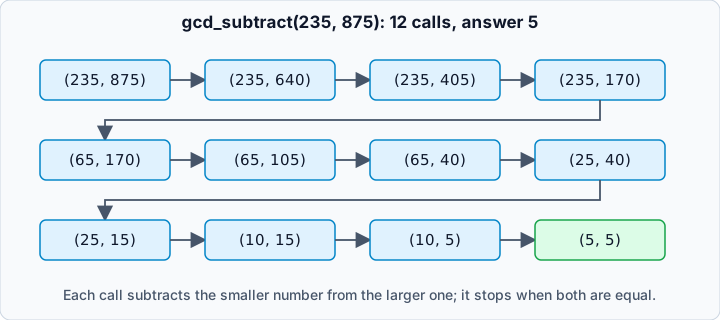
Figure 2: Each call replaces the larger number with the difference until both are equal.
def gcd_subtract(a, b):
    if a == 0 or a == b:    # base cases
        return b
    if b == 0:
        return a
    if a > b:
        return gcd_subtract(a - b, b)
    return gcd_subtract(a, b - a)

print(gcd_subtract(235, 875))
Output:
5This works but it is slow when one number is much larger than the other: gcd_subtract(1, 1_000_000) needs a million calls and exceeds Python’s recursion limit. Replacing repeated subtraction by the remainder operator gives Euclid’s algorithm, which needs only about log(min(a, b)) steps.
def gcd_subtract(a, b):
    if a == 0 or a == b:
        return b
    if b == 0:
        return a
    if a > b:
        return gcd_subtract(a - b, b)
    return gcd_subtract(a, b - a)

def gcd_euclid(a, b):
    while b:
        a, b = b, a % b
    return a

try:
    gcd_subtract(1, 1_000_000)
except RecursionError:
    print("subtraction version: RecursionError")
print("Euclid version:", gcd_euclid(1, 1_000_000))
print("235 and 875:", gcd_euclid(235, 875))
Output:
subtraction version: RecursionError
Euclid version: 1
235 and 875: 5
Edge cases to test: gcd(0, n) (answer n), equal numbers, and one number dividing the other.
Classes and Objects
A class is a blueprint; an object (instance) is something built from it. Data stored on an object is called an instance variable. Read the official tutorial on classes for the full picture.
Constructors and Instance Variables
__init__ is the constructor: Python calls it automatically when you create an object. self is the object being built.
class Sensor:
    def __init__(self, name, unit="C"):
        self.name = name
        self.unit = unit

    def describe(self):
        return f"{self.name} measures in {self.unit}"

temp = Sensor("thermo-1")
hum = Sensor("hygro-1", unit="%")
print(temp.describe())
print(hum.describe())
Output:
thermo-1 measures in C
hygro-1 measures in %
You can also write __init__(self) with no extra parameters and give every object the same starting values; the caller then writes Sensor() with empty parentheses.
Inspecting an Object with dict
Instance variables can be created in three places: inside __init__, inside any other method (only when that method runs), or from outside the class. The __dict__ attribute shows what an object currently holds.
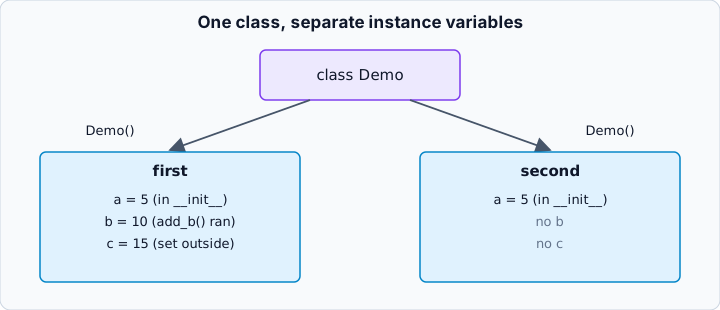
Figure 3: Instance variables belong to each object, not to the class.
class Demo:
    def __init__(self):
        self.a = 5          # created with the object

    def add_b(self):
        self.b = 10         # created only when add_b() runs

first = Demo()
second = Demo()
first.add_b()
first.c = 15                # created from outside the class
print(first.__dict__)
print(second.__dict__)
Output:
{'a': 5, 'b': 10, 'c': 15}
{'a': 5}
Only first received b and c. Common mistake: reading an attribute that was never created.
class Box:
    def __init__(self):
        self.a = 1

    def set_b(self):
        self.b = 2

box = Box()
try:
    print(box.b)
except AttributeError as error:
    print("AttributeError:", error)
Output:
AttributeError: 'Box' object has no attribute 'b'Good practice: create every instance variable in __init__ so each object always has the same shape.
Multiple Inheritance
When a class inherits from more than one parent, it is using multiple inheritance, and Python supports it. List the parents in parentheses.
class Sensor:
    def read(self):
        return "reading data"

class Logger:
    def log(self, message):
        return f"LOG: {message}"

class SmartSensor(Sensor, Logger):
    pass

device = SmartSensor()
print(device.read())
print(device.log("started"))
Output:
reading data
LOG: started
When two parents define the same method name, Python needs a rule to decide which wins. That rule is the method resolution order (MRO): the order in which classes are searched, left to right with parents after children. You can print it, and the MRO how-to explains the algorithm.
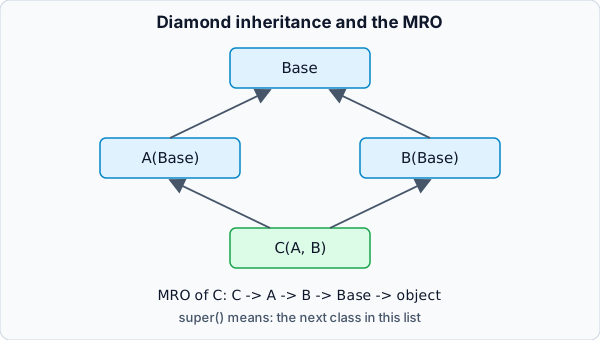
Figure 4: The diamond problem and the order Python searches for a method.
class Base:
    def hello(self):
        return "Base"

class A(Base):
    def hello(self):
        return "A -> " + super().hello()

class B(Base):
    def hello(self):
        return "B -> " + super().hello()

class C(A, B):
    pass

print(C().hello())
print([cls.__name__ for cls in C.__mro__])
Output:
A -> B -> Base
['C', 'A', 'B', 'Base', 'object']
super() does not mean “the parent”: it means “the next class in the MRO”. That is why A calls B, even though B is not a parent of A.
Operator Overloading
Special “dunder” methods let your objects work with operators. __add__ powers +, __mul__ powers *, __rmul__ handles 3 * obj when the left operand does not know your class, and __repr__ controls how the object prints. See the data model reference.
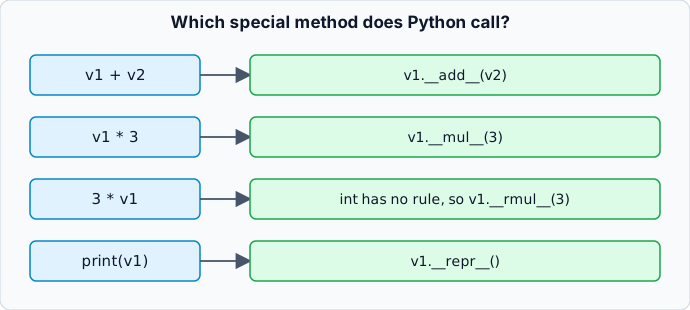
Figure 5: Which special method Python calls for each expression.
class Vector:
    def __init__(self, x=0, y=0):
        self.x = x
        self.y = y

    def __add__(self, other):
        return Vector(self.x + other.x, self.y + other.y)

    def __mul__(self, other):
        if isinstance(other, Vector):          # element-wise product
            return Vector(self.x * other.x, self.y * other.y)
        return Vector(self.x * other, self.y * other)   # scalar product

    def __rmul__(self, other):                 # handles 3 * v
        return self * other

    def __repr__(self):
        return f"Vector({self.x}, {self.y})"

v1 = Vector(2, 3)
v2 = Vector(3, 4)
print(v1 + v2)
print(v1 * v2)
print(v1 * 3)
print(3 * v1)
Output:
Vector(5, 7)
Vector(6, 12)
Vector(6, 9)
Vector(6, 9)
Common mistakes: forgetting __rmul__ (then 3 * v1 raises TypeError), and assuming v1 * v2 is a dot product. Here it multiplies component by component; a dot product would be a different, explicitly named method.
Number Problems
Many classic exercises ask you to test a property of an integer. The method is always the same: translate the definition into a loop or a formula, then test edge cases (0, 1, negatives, and large inputs).
Finding Factors
A factor of n is a number that divides it with no remainder. Test every candidate from 1 to n with the remainder operator.
n = int(input("Enter a number: "))
factors = [i for i in range(1, n + 1) if n % i == 0]
print(factors)
Output:
Enter a number: 45
[1, 3, 5, 9, 15, 45]
This takes n steps. The optimized version appears in exercise B7.
Prime Numbers
A prime is an integer greater than 1 whose only factors are 1 and itself. If a number has a factor larger than its square root, it must also have a smaller partner factor, so testing up to math.isqrt(n) is enough: roughly √n steps instead of n.
import math

def is_prime(n):
    if n < 2:
        return False
    for divisor in range(2, math.isqrt(n) + 1):
        if n % divisor == 0:
            return False
    return True

print([n for n in range(1, 31) if is_prime(n)])
print(is_prime(0), is_prime(1), is_prime(2), is_prime(97))
Output:
[2, 3, 5, 7, 11, 13, 17, 19, 23, 29]
False False True True
The tests for 0, 1, and 2 matter: 0 and 1 are not prime, and 2 is the only even prime.
More number problems (perfect and abundant numbers, pronic numbers, strong numbers, automorphic numbers) are in the practice section.
Arithmetic and Geometric Series
A series problem asks for the sum of the first N terms. The reliable method is to find the formula for term i, then add it in a loop.
- Arithmetic series: each term adds a fixed step. Term
iisfirst + (i - 1) * step. - Geometric series: each term multiplies by a fixed ratio. Term
iisfirst * ratio ** (i - 1).
def arithmetic_sum(first, step, terms):
    total = 0
    for i in range(1, terms + 1):
        total += first + (i - 1) * step
    return total

print(arithmetic_sum(1, 1, 20))     # 1 + 2 + ... + 20
print(arithmetic_sum(9, 4, 20))     # 9 + 13 + 17 + ...
print(arithmetic_sum(2, 2, 20))     # 2 + 4 + 6 + ... (20 terms)
print(arithmetic_sum(10, -1, 10))   # 10 + 9 + 8 + ... + 1
Output:
210
940
420
55
The closed form terms / 2 * (2 * first + (terms - 1) * step) gives the same answer without a loop, which is a good cross-check:
def arithmetic_sum_formula(first, step, terms):
    return terms * (2 * first + (terms - 1) * step) // 2

print(arithmetic_sum_formula(9, 4, 20))
Output:
940Geometric series work the same way. Keep the term and the running total separate:
def geometric_sum(first, ratio, terms):
    total = 0
    term = first
    for _ in range(terms):
        total += term
        term *= ratio
    return total

print(geometric_sum(2, 2, 20))      # 2 + 4 + 8 + ...
print(geometric_sum(2, 3, 20))      # 2 + 6 + 18 + ...
print(geometric_sum(10, 3, 20))     # 10 + 30 + 90 + ...
print(2 * (2 ** 20 - 1))            # formula: first * (ratio**n - 1) / (ratio - 1)
Output:
2097150
3486784400
17433922000
2097150
Fractional and alternating series use the same pattern with a more complex term. Examples are in exercises I6, I7, and A8.
Pattern Printing
Pattern problems look like puzzles but follow one method: a pattern is a table of rows and columns, so use an outer loop for rows (i) and an inner loop for columns (j). Decide what each cell prints from i and j.
Rows, Columns, and the Index Map
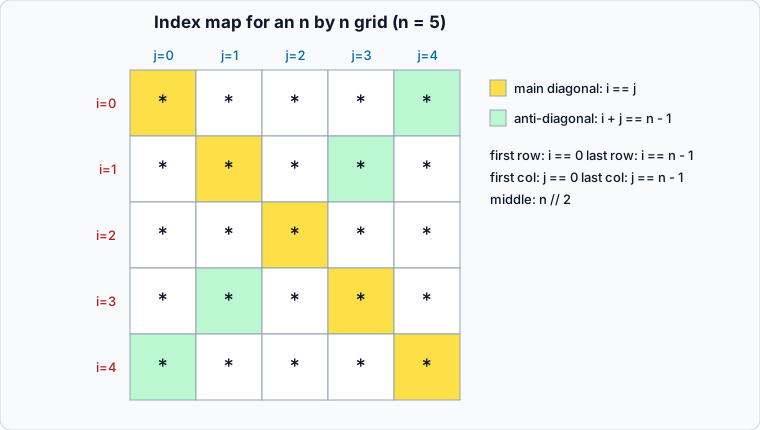
Figure 6: Useful conditions for an n by n grid, with n = 5.
| Position | Condition |
|---|---|
| First row | i == 0 |
| Last row | i == n - 1 |
| First column | j == 0 |
| Last column | j == n - 1 |
| Middle row or column | i == n // 2 or j == n // 2 |
| Main diagonal | i == j |
| Anti-diagonal | i + j == n - 1 |
Start with the simplest grid: a square.
n = 5
for i in range(n):
    for j in range(n):
        print("*", end=" ")
    print()      # new line after each row
Output:
* * * * *
* * * * *
* * * * *
* * * * *
* * * * *
The print() at the end of the outer loop is easy to forget; without it all rows join into one line.
Using the conditions in the table, an if inside the inner loop turns the square into a hollow square or a diagonal:
n = 5
for i in range(n):
    for j in range(n):
        if i == 0 or i == n - 1 or j == 0 or j == n - 1:
            print("*", end=" ")
        else:
            print(" ", end=" ")
    print()
Output:
* * * * *
*       *
*       *
*       *
* * * * *
Triangles of Stars and Numbers
For a right triangle, row i simply prints i + 1 cells, so the inner loop’s range depends on the outer variable.
n = 5
for i in range(1, n + 1):
    for j in range(i):
        print("*", end=" ")
    print()
Output:
*
* *
* * *
* * * *
* * * * *
Printing the column number instead of a star gives a number triangle:
n = 5
for i in range(1, n + 1):
    for j in range(1, i + 1):
        print(j, end=" ")
    print()
Output:
1
1 2
1 2 3
1 2 3 4
1 2 3 4 5
Floyd’s triangle keeps counting across rows, so it needs a counter that is not reset inside the outer loop:
n = 5
counter = 1
for i in range(1, n + 1):
    for _ in range(i):
        print(counter, end=" ")
        counter += 1
    print()
Output:
1
2 3
4 5 6
7 8 9 10
11 12 13 14 15
A common mistake is writing i += 1 at the end of a for loop body. It has no effect, because for reassigns i from the range on the next turn.
Letter Patterns with chr and ord
Characters have numeric codes: ord("A") is 65 and chr(65) is "A". Letters are consecutive, so chr(65 + k) is the k-th letter of the alphabet, which lets you reuse every number pattern for letters.
n = 5
for i in range(n):
    for j in range(i + 1):
        print(chr(65 + i), end=" ")     # row i repeats letter i
    print()

print()

code = 0
for i in range(1, n + 1):               # Floyd's triangle with letters
    for _ in range(i):
        print(chr(65 + code % 26), end=" ")
        code += 1
    print()
Output:
A
B B
C C C
D D D D
E E E E E

A
B C
D E F
G H I J
K L M N O
The % 26 makes the sequence wrap back to A after Z; without it, patterns with many rows would print symbols instead of letters. See chr() in the docs.
Centered Pyramids
A centered pyramid is a triangle with leading spaces. Each row has two jobs: print the spaces, then print the content. The diagram shows the anatomy of one row.
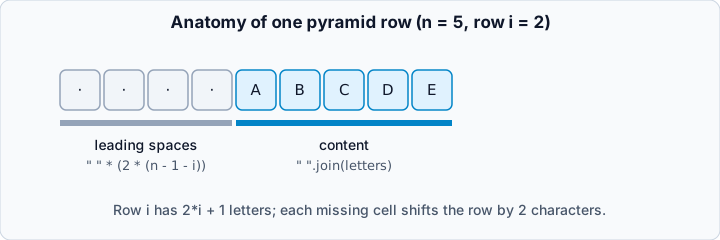
Figure 7: A pyramid row is leading spaces plus content.
Because each printed cell occupies two characters (a letter and a space), each missing cell is two spaces. For the letter pyramid A, A B C, A B C D E, … row i has 2 * i + 1 letters.
n = 5
for i in range(n):
    indent = " " * (2 * (n - 1 - i))
    letters = [chr(65 + k) for k in range(2 * i + 1)]
    print(indent + " ".join(letters))
Output:
        A
      A B C
    A B C D E
  A B C D E F G
A B C D E F G H I
" ".join(list) glues items with a space between them and no trailing space, which is cleaner than print(x, end=" ").
Alternating Characters
The row number can choose what to print. In this inverted triangle, even rows print z and odd rows print o, and each row is shorter than the last:
n = 6
for i in range(n):
    ch = "z" if i % 2 == 0 else "o"
    count = 2 * (n - i) - 1
    print(" " * (2 * i) + " ".join([ch] * count))
Output:
z z z z z z z z z z z
  o o o o o o o o o
    z z z z z z z
      o o o o o
        z z z
          o
[ch] * count builds a list with count copies of ch. More pattern exercises (right-aligned triangles, diamonds, palindromic pyramids, and patterns built from a word) are in the practice section.
Strings and ASCII Codes
Strings can be indexed (s[0]), sliced (s[1:4]), and reversed with the slice s[::-1]. Combined with chr and int, this solves a classic decoding puzzle.
Problem: a message was encoded by converting each character to its ASCII code, concatenating the digits, and reversing the whole string. Decode it. Only letters (A-Z = 65-90, a-z = 97-122) and spaces (32) occur.
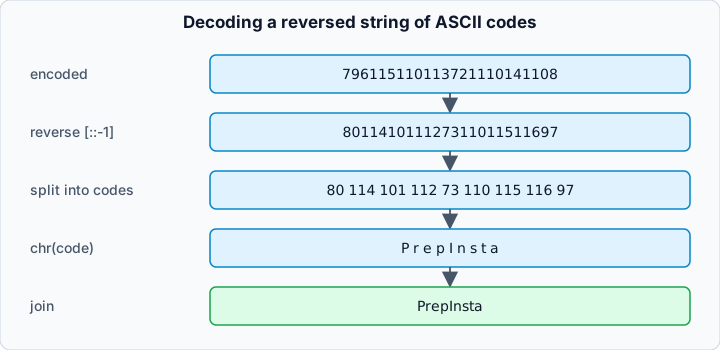
Figure 8: Decoding a reversed string of ASCII codes.
Logic. After reversing, read codes from left to right. A code has two or three digits. Codes 32, 65-90, and 97-99 have two digits; codes 100-122 have three. The three-digit codes begin with 10, 11, or 12, which are never valid two-digit codes, so one simple rule is unambiguous: if the next two digits form a valid two-digit code, take two digits; otherwise take three.
def encode(text):
    return "".join(str(ord(ch)) for ch in text)[::-1]

def decode(encoded):
    digits = encoded[::-1]
    result = []
    i = 0
    while i < len(digits):
        two = int(digits[i:i + 2])
        if two == 32 or 65 <= two <= 90 or 97 <= two <= 99:
            result.append(chr(two))
            i += 2
        else:
            three = int(digits[i:i + 3])
            if not 100 <= three <= 122:
                raise ValueError(f"invalid code near position {i}")
            result.append(chr(three))
            i += 3
    return "".join(result)

secret = encode("PrepInsta")
print(secret)
print(decode(secret))
print(decode(encode("Hello World")))
Output:
796115110113721110141108
PrepInsta
Hello World
The loop reads each digit once, so the time is O(n). Edge cases: an empty string (returns "") and malformed input (raises ValueError instead of printing garbage).
Common Mistakes Worth Learning From
Short solutions that pass one test can still be wrong. These bugs appear again and again in interview solutions; each is shown with its fix.
1. Multiplying inside the sum (off by one term). To sum 2 + 4 + 8 + ..., this code adds a * 2 instead of a, so the series silently starts at 4:
total, a = 0, 2
for _ in range(20):
    total += a * 2      # wrong: adds the NEXT term
    a *= 2
print("buggy:", total)

total, a = 0, 2
for _ in range(20):
    total += a          # correct: add the current term, then advance
    a *= 2
print("fixed:", total)
Output:
buggy: 4194300
fixed: 2097150
2. Wrong ratio for the series. For 5 + 25 + 125 + ... the ratio is 5. Using a = a * 3 (copied from another series) runs without any error but computes 5 + 15 + 45 + .... Always check the first three printed terms against the series before trusting the sum.
3. Typos in variable names. Python only reports a misspelled name when the line runs:
result2 = 27.5
try:
    print(resutl2)
except NameError as error:
    print("NameError:", error)
Output:
NameError: name 'resutl2' is not defined4. Reusing the loop variable of an outer loop. Writing for i in ... inside another for i in ... often works by accident, but it hides intent and breaks as soon as you use i after the inner loop. Use i, j, k for nested loops.
5. Stale outputs. In a notebook, a cell’s output may come from an earlier version of the code. Restart the kernel and run all cells before you trust a result.
Practice Exercises
Try each exercise on your own before opening the hint, and open the solution last. Exercises are grouped by difficulty.
Beginner Exercises
Exercise B1: Safe Sum of Two Numbers
Problem: Read two numbers from the user and print their sum. If either value is not a whole number, print Please enter whole numbers.
Example: input 12 and 30 gives Sum: 42.
Hint
int() raises ValueError for text such as "abc". Catch it with try/except.
Solution
def read_int(prompt):
    try:
        return int(input(prompt))
    except ValueError:
        return None

a = read_int("First number: ")
b = read_int("Second number: ")

if a is None or b is None:
    print("Please enter whole numbers.")
else:
    print("Sum:", a + b)
Output:
First number: 12
Second number: 30
Sum: 42
read_int returns None when conversion fails, so the main code can check both values at once. Typing abc for either prompt triggers the message.
Exercise B2: Greeting with Default Arguments
Problem: Write greet(name, greeting="Hello", punctuation="!") that returns a greeting string.
Example: greet("Aya") returns Hello, Aya!; greet("Omar", "Welcome", ".") returns Welcome, Omar.
Hint
Use an f-string and keep defaulted parameters after name.
Solution
def greet(name, greeting="Hello", punctuation="!"):
    return f"{greeting}, {name}{punctuation}"

print(greet("Aya"))
print(greet("Omar", "Welcome", "."))
print(greet("Lina", punctuation="?"))
Output:
Hello, Aya!
Welcome, Omar.
Hello, Lina?
Keyword arguments let the caller skip greeting and set only punctuation.
Exercise B3: Keep Only the Strings
Problem: From a mixed list, return a new list containing only the strings.
Example: ["abc", 34.56, 32, "b", 55] gives ['abc', 'b'].
Hint
isinstance(x, str) is true for strings. A list comprehension keeps the code short.
Solution
def only_strings(items):
    return [x for x in items if isinstance(x, str)]

print(only_strings(["abc", 34.56, 32, "b", 55, "90"]))
print(only_strings([]))
Output:
['abc', 'b', '90']
[]
Unlike the integer case, there is no subclass trap here. The empty-list test confirms an empty input produces an empty result.
Exercise B4: Average of Any Number of Values
Problem: Write average(*numbers). Raise ValueError if no numbers are given.
Example: average(4, 8, 15) gives 9.0.
Hint
numbers is a tuple. Check len(numbers) before dividing.
Solution
def average(*numbers):
    if not numbers:
        raise ValueError("average() needs at least one number")
    return sum(numbers) / len(numbers)

print(average(4, 8, 15))
try:
    average()
except ValueError as error:
    print("ValueError:", error)
Output:
9.0
ValueError: average() needs at least one number
Raising an error is better than returning 0, because an average of nothing is undefined, not zero.
Exercise B5: Right Triangle of Stars
Problem: Write star_triangle(n) that prints n rows, where row i has i stars separated by spaces.
Example (n = 4):
*
* *
* * *
* * * *
Hint
"*" repeated i times, joined by spaces: " ".join("*" * i).
Solution
def star_triangle(n):
    for i in range(1, n + 1):
        print(" ".join("*" * i))

star_triangle(4)
Output:
*
* *
* * *
* * * *
The row number equals the star count, so no inner loop is needed. For n = 0 nothing prints.
Exercise B6: Number Triangle
Problem: For n = 5, print rows 1, 1 2, 1 2 3, 1 2 3 4, 1 2 3 4 5.
Hint
The inner loop runs j from 1 to i. Or unpack a range with print(*range(1, i + 1)).
Solution
n = 5
for i in range(1, n + 1):
    print(*range(1, i + 1))
Output:
1
1 2
1 2 3
1 2 3 4
1 2 3 4 5
*range(...) unpacks the numbers as separate arguments, and print places a space between them by default.
Exercise B7: Factors in Square-Root Time
Problem: Return the sorted factors of n while testing only up to √n.
Example: factors(36) gives [1, 2, 3, 4, 6, 9, 12, 18, 36].
Hint
If d divides n, then n // d also divides n. Collect both in a set to avoid duplicating the square root of a perfect square.
Solution
import math

def factors(n):
    found = set()
    for d in range(1, math.isqrt(n) + 1):
        if n % d == 0:
            found.add(d)
            found.add(n // d)
    return sorted(found)

print(factors(36))
print(factors(45))
print(factors(1))
Output:
[1, 2, 3, 4, 6, 9, 12, 18, 36]
[1, 3, 5, 9, 15, 45]
[1]
Time complexity drops from O(n) to O(√n). The set matters for 36, where 6 * 6 would otherwise list 6 twice.
Intermediate Exercises
Exercise I1: Floyd’s Triangle
Problem: Print Floyd’s triangle with n rows.
Example (n = 5): rows 1, 2 3, 4 5 6, 7 8 9 10, 11 12 13 14 15.
Hint
Row i has i numbers. Row i starts right after the last number of row i - 1, which is i * (i - 1) // 2.
Solution
n = 5
for i in range(1, n + 1):
    start = i * (i - 1) // 2 + 1
    print(*range(start, start + i))
Output:
1
2 3
4 5 6
7 8 9 10
11 12 13 14 15
This version replaces the running counter by a formula (the number of items printed before the row is 1 + 2 + ... + (i - 1)). Both approaches work; the counter is easier to read, the formula avoids shared state.
Exercise I2: Primes with the Sieve of Eratosthenes
Problem: List all primes up to N without testing each number separately.
Example: N = 30 gives [2, 3, 5, 7, 11, 13, 17, 19, 23, 29].
Hint
Start with a list of True flags. For each prime p, cross out its multiples starting at p * p.
Solution
def primes_up_to(limit):
    if limit < 2:
        return []
    is_prime = [True] * (limit + 1)
    is_prime[0] = is_prime[1] = False
    p = 2
    while p * p <= limit:
        if is_prime[p]:
            for multiple in range(p * p, limit + 1, p):
                is_prime[multiple] = False
        p += 1
    return [n for n, flag in enumerate(is_prime) if flag]

print(primes_up_to(30))
print(primes_up_to(1))
Output:
[2, 3, 5, 7, 11, 13, 17, 19, 23, 29]
[]
Multiples smaller than p * p were already crossed out by smaller primes. Time complexity is about O(n log log n), much faster than trial division when many numbers are checked.
Exercise I3: Perfect, Abundant, or Deficient
Problem: Add up the proper divisors of n (divisors smaller than n). If the sum equals n the number is perfect; if greater, abundant; if smaller, deficient.
Example: 6 is perfect (1 + 2 + 3), 12 is abundant (16), 34 is deficient (20).
Hint
range(1, n) excludes n, which is exactly the proper-divisor range.
Solution
def classify(n):
    total = sum(d for d in range(1, n) if n % d == 0)
    if total == n:
        return "perfect"
    return "abundant" if total > n else "deficient"

for n in (6, 12, 28, 34):
    print(n, classify(n))
Output:
6 perfect
12 abundant
28 perfect
34 deficient
For n = 1 the sum is 0, so 1 is deficient. Time is O(n) per number.
Exercise I4: Pronic Numbers
Problem: A pronic number is the product of two consecutive integers, such as 7 * 8 = 56. List the pronic numbers from 1 to 100.
Hint
If n = k * (k + 1), then k * k <= n < (k + 1) * (k + 1), so k = math.isqrt(n).
Solution
import math

def is_pronic(n):
    k = math.isqrt(n)
    return k * (k + 1) == n

print([n for n in range(1, 101) if is_pronic(n)])
print(is_pronic(56), is_pronic(57))
Output:
[2, 6, 12, 20, 30, 42, 56, 72, 90]
True False
Computing k directly avoids a loop and makes each check O(1). Mathematically 0 = 0 * 1 is also pronic; the range starts at 1 here.
Exercise I5: Strong (Krishnamurthy) Numbers
Problem: A number is strong when it equals the sum of the factorials of its digits (for example 145 = 1! + 4! + 5!). Find all strong numbers below 50,000.
Hint
Peel digits with % 10 and // 10 and add math.factorial(digit). Precompute factorials of 0-9 for speed.
Solution
import math

FACT = [math.factorial(d) for d in range(10)]

def is_strong(n):
    total, m = 0, n
    while m:
        total += FACT[m % 10]
        m //= 10
    return total == n

print([n for n in range(1, 50000) if is_strong(n)])
print(is_strong(145))
Output:
[1, 2, 145, 40585]
True
The results are 1, 2, 145, and 40585. A frequent testing mistake is trusting one printed answer: always check a known strong number such as 145 and a known non-member.
Exercise I6: Arithmetic Series with a Formula Check
Problem: Compute 9 + 13 + 17 + ... for N terms with a loop, and check it against the closed form.
Example: N = 20 gives 940.
Hint
The closed form is N * (2 * first + (N - 1) * step) // 2.
Solution
def loop_sum(first, step, n):
    total, term = 0, first
    for _ in range(n):
        total += term
        term += step
    return total

def formula_sum(first, step, n):
    return n * (2 * first + (n - 1) * step) // 2

for n in (1, 5, 20):
    a, b = loop_sum(9, 4, n), formula_sum(9, 4, n)
    print(n, a, b, a == b)
Output:
1 9 9 True
5 85 85 True
20 940 940 True
Comparing two independent methods is a strong way to catch off-by-one mistakes. The loop is O(N), the formula O(1).
Exercise I7: Geometric and Alternating Series
Problem: Compute (a) 5 + 25 + 125 + ... for 10 terms, and (b) the alternating series 2 - 6 + 18 - 54 + ... for 20 terms.
Hint
For (a) the ratio is 5. For (b) the ratio is -3; negative ratios flip the sign automatically.
Solution
def geometric_sum(first, ratio, terms):
    total, term = 0, first
    for _ in range(terms):
        total += term
        term *= ratio
    return total

print(geometric_sum(5, 5, 10))
print(geometric_sum(2, -3, 20))
print(5 * (5 ** 10 - 1) // 4)             # formula check for (a)
print(2 * (1 - (-3) ** 20) // (1 + 3))    # formula check for (b)
Output:
12207030
-1743392200
12207030
-1743392200
Treating the alternating series as a geometric series with ratio -3 removes the need for an if on even and odd positions.
Exercise I8: Triangles from a Word
Problem: For the word CODER, print (a) one triangle where row i is the first i + 1 letters, and (b) a triangle where row i repeats the i-th letter i + 1 times.
Hint
Use slicing for (a): word[:i + 1]. For (b) repeat a one-letter list.
Solution
word = "CODER"
n = len(word)

for i in range(n):
    print(" ".join(word[:i + 1]))

print()

for i in range(n):
    print(" ".join([word[i]] * (i + 1)))
Output:
C
C O
C O D
C O D E
C O D E R

C
O O
D D D
E E E E
R R R R R
" ".join("COD") treats the string as a sequence of characters. Using len(word) keeps the code working for any word.
Exercise I9: Odd-Number Pyramid
Problem: Print a pyramid where row i contains 1, 2, ..., 2i - 1.
Example (n = 5):
        1
      1 2 3
    1 2 3 4 5
  1 2 3 4 5 6 7
1 2 3 4 5 6 7 8 9
Hint
Indent by 2 * (n - i) spaces, then print the numbers 1 to 2i - 1.
Solution
n = 5
for i in range(1, n + 1):
    indent = " " * (2 * (n - i))
    print(indent + " ".join(str(k) for k in range(1, 2 * i)))
Output:
        1
      1 2 3
    1 2 3 4 5
  1 2 3 4 5 6 7
1 2 3 4 5 6 7 8 9
range(1, 2 * i) stops at 2i - 1. str(k) is required because join accepts only strings; for numbers above 9 the alignment shifts, which is a good extension challenge.
Exercise I10: Right-Aligned Countdown Triangles
Problem: Print these right-aligned triangles for n = 5: (a) 54321, 4321, 321, 21, 1; (b) EDCBA, EDCB, EDC, ED, E; (c) EDCBA, DCBA, CBA, BA, A; (d) the word CODER reversed, losing its first letter on each row (REDOC, EDOC, DOC, OC, C).
Hint
Every row is either a slice from the end or a slice from the start of one sequence, indented by 2 * i spaces. Write one helper and feed it different sequences.
Solution
def right_aligned(sequence, keep="end"):
    n = len(sequence)
    for i in range(n):
        part = sequence[i:] if keep == "end" else sequence[:n - i]
        print(" " * (2 * i) + " ".join(part))

right_aligned("54321")
print()
right_aligned("EDCBA", keep="start")
print()
right_aligned("EDCBA")
print()
right_aligned("CODER"[::-1])
Output:
5 4 3 2 1
  4 3 2 1
    3 2 1
      2 1
        1

E D C B A
  E D C B
    E D C
      E D
        E

E D C B A
  D C B A
    C B A
      B A
        A

R E D O C
  E D O C
    D O C
      O C
        C
One function covers four patterns because they differ only in the sequence and in which end the slice keeps. Strings are sequences, so " ".join(part) works on slices of them directly. For numbers above 9 build a list of strings instead of a digit string.
Advanced Exercises
Exercise A1: Sort Records with a Lambda Key
Problem: Sort students by score from highest to lowest; break ties alphabetically by name.
Example: [("Omar", 14), ("Aya", 17), ("Lina", 14)] gives [('Aya', 17), ('Lina', 14), ('Omar', 14)].
Hint
A key can return a tuple. Negate the score to sort it descending.
Solution
students = [("Omar", 14), ("Aya", 17), ("Lina", 14)]
ranked = sorted(students, key=lambda s: (-s[1], s[0]))
print(ranked)
Output:
[('Aya', 17), ('Lina', 14), ('Omar', 14)]Tuples compare element by element, so the name only matters when scores tie. Negation works for numbers; for descending strings use reverse=True in two passes.
Exercise A2: Euclid’s GCD, LCM, and Step Count
Problem: Write a recursive Euclid GCD, then use it to compute the least common multiple. Count how many calls the subtraction method and Euclid’s method need for (235, 875).
Hint
gcd(a, b) = gcd(b, a % b), with base case b == 0. And lcm(a, b) = a * b // gcd(a, b).
Solution
def gcd_euclid(a, b, calls=1):
    if b == 0:
        return a, calls
    return gcd_euclid(b, a % b, calls + 1)

def gcd_subtract(a, b, calls=1):
    if a == 0 or a == b:
        return b, calls
    if b == 0:
        return a, calls
    if a > b:
        return gcd_subtract(a - b, b, calls + 1)
    return gcd_subtract(a, b - a, calls + 1)

g1, c1 = gcd_euclid(235, 875)
g2, c2 = gcd_subtract(235, 875)
print("Euclid:", g1, "in", c1, "calls")
print("Subtraction:", g2, "in", c2, "calls")
print("LCM:", 235 * 875 // g1)
Output:
Euclid: 5 in 10 calls
Subtraction: 5 in 12 calls
LCM: 41125
Both give 5, but Euclid’s remainder step collapses many subtractions into one. Complexity is O(log min(a, b)) for Euclid versus up to O(max / min) for subtraction.
Exercise A3: Palindromic Letter Pyramids
Problem: Print (a) the pyramid A, ABA, ABCBA, … and (b) the mirrored pyramid E, DED, CDEDC, BCDEDCB, ABCDEDCBA, both for n = 5.
Hint
For (a), row i is the letters A..i followed by the letters i-1..A. For (b), row i starts i letters earlier than E, runs up to E, then back down.
Solution
n = 5
letters = [chr(65 + k) for k in range(n)]      # A..E

for i in range(n):                              # (a)
    row = letters[:i + 1] + letters[:i][::-1]
    print(" " * (2 * (n - 1 - i)) + " ".join(row))

print()

for i in range(n):                              # (b)
    start = n - 1 - i
    row = letters[start:] + letters[start:n - 1][::-1]
    print(" " * (2 * (n - 1 - i)) + " ".join(row))
Output:
        A
      A B A
    A B C B A
  A B C D C B A
A B C D E D C B A

        E
      D E D
    C D E D C
  B C D E D C B
A B C D E D C B A
Part (a) is an ascending slice plus the reverse of a shorter slice. Part (b) reuses the same idea with a slice that grows from the end. Printing the slices on paper first makes the indexes obvious.
Exercise A4: Number Diamond
Problem: Print a diamond where row k repeats the number k exactly 2k - 1 times, growing to n and shrinking back to 1.
Example (n = 3):
    1
  2 2 2
3 3 3 3 3
  2 2 2
    1
Hint
Build the row numbers 1, 2, ..., n, n-1, ..., 1, then print each row with indent 2 * (n - k).
Solution
def number_diamond(n):
    rows = list(range(1, n + 1)) + list(range(n - 1, 0, -1))
    for k in rows:
        print(" " * (2 * (n - k)) + " ".join([str(k)] * (2 * k - 1)))

number_diamond(3)
print()
number_diamond(5)
Output:
    1
  2 2 2
3 3 3 3 3
  2 2 2
    1

        1
      2 2 2
    3 3 3 3 3
  4 4 4 4 4 4 4
5 5 5 5 5 5 5 5 5
  4 4 4 4 4 4 4
    3 3 3 3 3
      2 2 2
        1
Describing the diamond as one list of row values avoids two separate loops. The [str(k)] * (2k - 1) form also works when k has two digits, unlike joining a repeated string.
Exercise A5: Decode a Numbered String
Problem: Using the encoding from the strings section, write a decode function that rejects invalid input, and prove it works with a round trip.
Hint
Round trip: decode(encode(text)) == text for any text made of letters and spaces. Test many strings automatically.
Solution
import random
import string

def encode(text):
    return "".join(str(ord(ch)) for ch in text)[::-1]

def decode(encoded):
    digits = encoded[::-1]
    out, i = [], 0
    while i < len(digits):
        two = int(digits[i:i + 2])
        if two == 32 or 65 <= two <= 90 or 97 <= two <= 99:
            out.append(chr(two))
            i += 2
        else:
            three = int(digits[i:i + 3])
            if not 100 <= three <= 122:
                raise ValueError("invalid encoded string")
            out.append(chr(three))
            i += 3
    return "".join(out)

random.seed(1)
alphabet = string.ascii_letters + " "
for _ in range(1000):
    text = "".join(random.choice(alphabet) for _ in range(random.randint(0, 20)))
    assert decode(encode(text)) == text
print("1000 random round trips passed")

try:
    decode("999")
except ValueError as error:
    print("ValueError:", error)
Output:
1000 random round trips passed
ValueError: invalid encoded string
A randomized round-trip test checks thousands of inputs in milliseconds, far more than manual examples. The assert stops the program on the first failure.
Exercise A6: A Complete Vector Class
Problem: Extend the Vector class with subtraction, equality, absolute value (length), and a readable repr.
Example: Vector(3, 4) has abs equal to 5.0, and Vector(5, 7) - Vector(2, 3) equals Vector(3, 4).
Hint
Use __sub__, __eq__, and __abs__. In __eq__, return NotImplemented for other types.
Solution
import math

class Vector:
    def __init__(self, x=0, y=0):
        self.x = x
        self.y = y

    def __add__(self, other):
        return Vector(self.x + other.x, self.y + other.y)

    def __sub__(self, other):
        return Vector(self.x - other.x, self.y - other.y)

    def __mul__(self, k):
        return Vector(self.x * k, self.y * k)

    __rmul__ = __mul__

    def __eq__(self, other):
        if not isinstance(other, Vector):
            return NotImplemented
        return (self.x, self.y) == (other.x, other.y)

    def __abs__(self):
        return math.hypot(self.x, self.y)

    def __repr__(self):
        return f"Vector({self.x}, {self.y})"

print(abs(Vector(3, 4)))
print(Vector(5, 7) - Vector(2, 3))
print(Vector(5, 7) - Vector(2, 3) == Vector(3, 4))
print(Vector(1, 1) == "not a vector")
print(2 * Vector(1, 2))
Output:
5.0
Vector(3, 4)
True
False
Vector(2, 4)
Returning NotImplemented lets Python try the other operand or fall back to False, instead of crashing. Defining __eq__ without __hash__ makes instances unhashable, which is acceptable for mutable objects.
Exercise A7: Cooperative Multiple Inheritance
Problem: Build classes Base, Logging, Validation, and Service(Logging, Validation), where each class adds a step to process(data) through super(). Show the order of the steps.
Hint
Each class appends its label and calls super().process(...). The Base class ends the chain.
Solution
class Base:
    def process(self, steps):
        steps.append("Base")
        return steps

class Logging(Base):
    def process(self, steps):
        steps.append("Logging")
        return super().process(steps)

class Validation(Base):
    def process(self, steps):
        steps.append("Validation")
        return super().process(steps)

class Service(Logging, Validation):
    def process(self, steps):
        steps.append("Service")
        return super().process(steps)

print(Service().process([]))
print([c.__name__ for c in Service.__mro__])
Output:
['Service', 'Logging', 'Validation', 'Base']
['Service', 'Logging', 'Validation', 'Base', 'object']
The order matches the MRO: Service, Logging, Validation, Base. Every class in the chain must call super() for cooperative inheritance to work; if one forgets, later classes are skipped.
Exercise A8: Fraction Series
Problem: Compute (a) 2/10 + 4/9 + 6/8 + ... + 20/1, and (b) (x+2)/10 + (x+4)/30 + (x+6)/90 + ... for N terms with x = 2.
Hint
For (a), term i is 2i / (11 - i). For (b), term i is (x + 2i) / (10 * 3 ** (i - 1)).
Solution
total_a = sum((2 * i) / (11 - i) for i in range(1, 11))
print(f"(a) {total_a:.6f}")

def series_b(x, n):
    return sum((x + 2 * i) / (10 * 3 ** (i - 1)) for i in range(1, n + 1))

print(f"(b) {series_b(2, 10):.6f}")
Output:
(a) 44.437302
(b) 0.749936
Deriving each term from i with a formula is less error-prone than updating several running variables. Printing with a fixed number of decimals avoids floating-point noise in the last digits.
Exercise A9: Automorphic Numbers
Problem: A number is automorphic when its square ends with the number itself (25 * 25 = 625). Find all automorphic numbers below 1000.
Hint
Compare n * n % 10 ** len(str(n)) with n.
Solution
def is_automorphic(n):
    digits = len(str(n))
    return n * n % 10 ** digits == n

print([n for n in range(1, 1000) if is_automorphic(n)])
print(is_automorphic(9))
Output:
[1, 5, 6, 25, 76, 376, 625]
False
Taking the square modulo 10 ** digits keeps only the last digits digits of the square. The same result can be reached by comparing digits one at a time with % 10 and // 10.
Exercise A10: Pyramid That Continues the Alphabet
Problem: Print a centered pyramid where row i holds 2i + 1 consecutive letters and the alphabet continues from one row to the next (A, then BCD, then EFGHI, …), for n = 5.
Hint
Keep a counter outside the outer loop, as in Floyd’s triangle, and use chr(65 + counter % 26).
Solution
n = 5
counter = 0
for i in range(n):
    row = []
    for _ in range(2 * i + 1):
        row.append(chr(65 + counter % 26))
        counter += 1
    print(" " * (2 * (n - 1 - i)) + " ".join(row))
Output:
        A
      B C D
    E F G H I
  J K L M N O P
Q R S T U V W X Y
The five rows use 1 + 3 + 5 + 7 + 9 = 25 letters, so the pyramid ends at Y. The % 26 keeps larger pyramids valid by wrapping around to A.
Summary and Next Steps
You have worked through the core toolkit: reading and converting input, printing with precision, conditions and loops, functions with default, variable-length, and keyword arguments, lambdas, recursion, classes with multiple inheritance and operator overloading, and the problem-solving habits behind number problems, series, and patterns.
The most transferable ideas are these:
- Translate definitions into code. Factors, primes, and series all start from a precise definition.
- Find the formula for term, row, or column
i. Then the loop writes itself. - Test the edges. Zero, one, empty input, and large values break many correct-looking solutions.
- Cross-check with a second method. A formula against a loop, or a round-trip test, catches silent mistakes.
From here, natural next steps are file handling and exceptions, generators and decorators, and then NumPy and pandas, where these same loops are replaced by vectorized operations. Keep the Python documentation close and practice a little every day.